 Tony Carnevale
The short answer
To track where a website lead came from, store each lead with the page it was sent from, the source of the visit (a referrer, an ad click id or a tagged link) and the pages read before it. Those three facts read every enquiry back to the marketing that caused it, without hidden fields or a CRM project.
Key takeaways
- A count of submissions by channel cannot answer a customer who asks how they found you. The stored lead can.
- Up to four clues name a visit's source: the referrer, an ad click id, utm tags, or a tracking link. Direct is what is left when none is present.
- A Meta ad click from inside the Facebook app arrives with an fbclid and no referrer. Drop the id and it reads as direct.
- The page the form was on and the pages read before it tell you which content did the work, per lead.
- Phone taps are leads with a source too. Count only forms and the report describes a minority of your enquiries.
To know where a lead came from, you need the lead itself stored with three facts attached: the page the form was sent from, the source of the visit, and the pages read before it. A count of form submissions by channel does not do it, because the moment one customer asks how they found you, you need the one row and the total is no use.
This is what I built the inbox in Venbit's analytics to hold. Every form submission and phone tap is stored outside the email path, with its page and its source, so when a customer says they filled out your form last Tuesday, you can look. The screens in this article are from the demo site, WebsiteMaintenance.com, and every number read from them is that site's.
What one lead carries
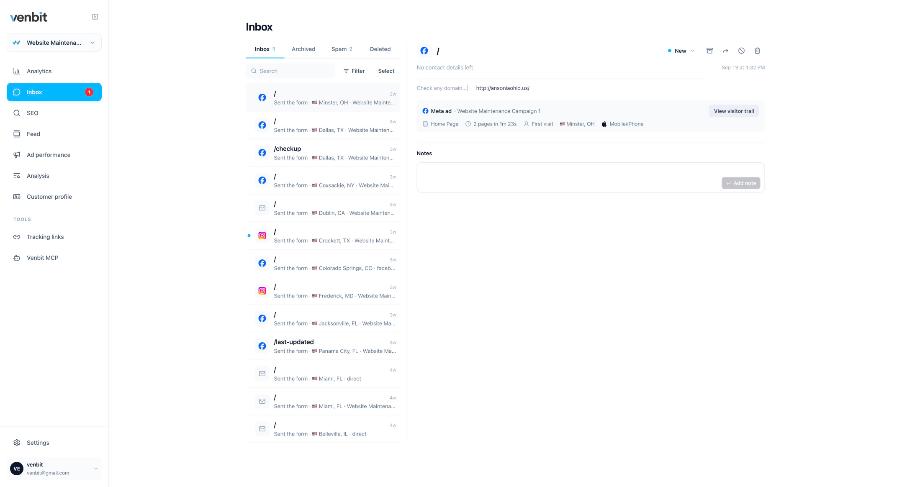
The lead above was sent from the home page by someone on an iPhone in Minster, Ohio, on their first visit, after two pages and one minute twenty-three seconds. The source line reads Meta ad, Website Maintenance Campaign 1. Under the message sit a notes box and a button to the visitor trail, which is the step-by-step record of that visit.
Five facts, from four places. The device and the pages are the tracker's own events. The town is IP geolocation, so it is approximate. First visit comes from the visitor ID, a random identifier in the browser with no cookie behind it. And the source, the fact this article is about, was read from the landing address and the referrer at the moment the person arrived, long before they typed anything.
Where a visit's source comes from
A visit arrives with up to four clues about where it came from.
| Clue | Who puts it there | What it tells you |
|---|---|---|
| Referrer | The visitor's browser, when they clicked a link on another site | The site they came from: google.com, facebook.com, a directory, a news story |
| Click id (gclid, fbclid, msclkid) | The ad platform, stamped on the landing address of every paid click | Which ad platform's link sent the visit. gclid and msclkid are only ever issued for an ad; fbclid rides on ordinary Facebook posts too, so a Meta click counts as an ad only when the link is also tagged as paid |
| Tagged link (utm parameters) | You, whoever made the link, or the platform's URL template | The campaign, the ad set and the ad, as named |
| Tracking link (vnbt.app/name) | You, for a flyer, a bio or a mailer you cannot tag | The visits and leads that one link brought, under the name you gave it |
Direct is the row that is not in the table, because it is not a source. Direct means the browser sent no referrer and the address carried no tags: a typed address, a bookmark, a link tapped in a text message or an email app. It is the absence of information. A lead filed under direct is a lead whose source you do not know, and reading it as a loyal customer who typed your name is wishful.
The click ids are the clue that matters most for paid traffic, because they arrive on sites nobody tagged. A Meta ad click from inside the Facebook app comes with an fbclid, no referrer and no utm parameters. Without the click id that visit reads as direct, and an owner paying Meta sees their ad traffic filed under came straight to the site. Keeping the id with the visit, and then with the lead, is what lets each lead name the ad platform that sent it.
The channel names on the dashboard (Search, Social, Ads, Direct) follow the rules Google publishes for GA4's Default Channel Group, because that is the only taxonomy anybody has standardised. A Google Business Profile link tagged utm_source=google and utm_medium=organic reads as search, which for a local trade is where much of the business starts.
Sources across the whole site
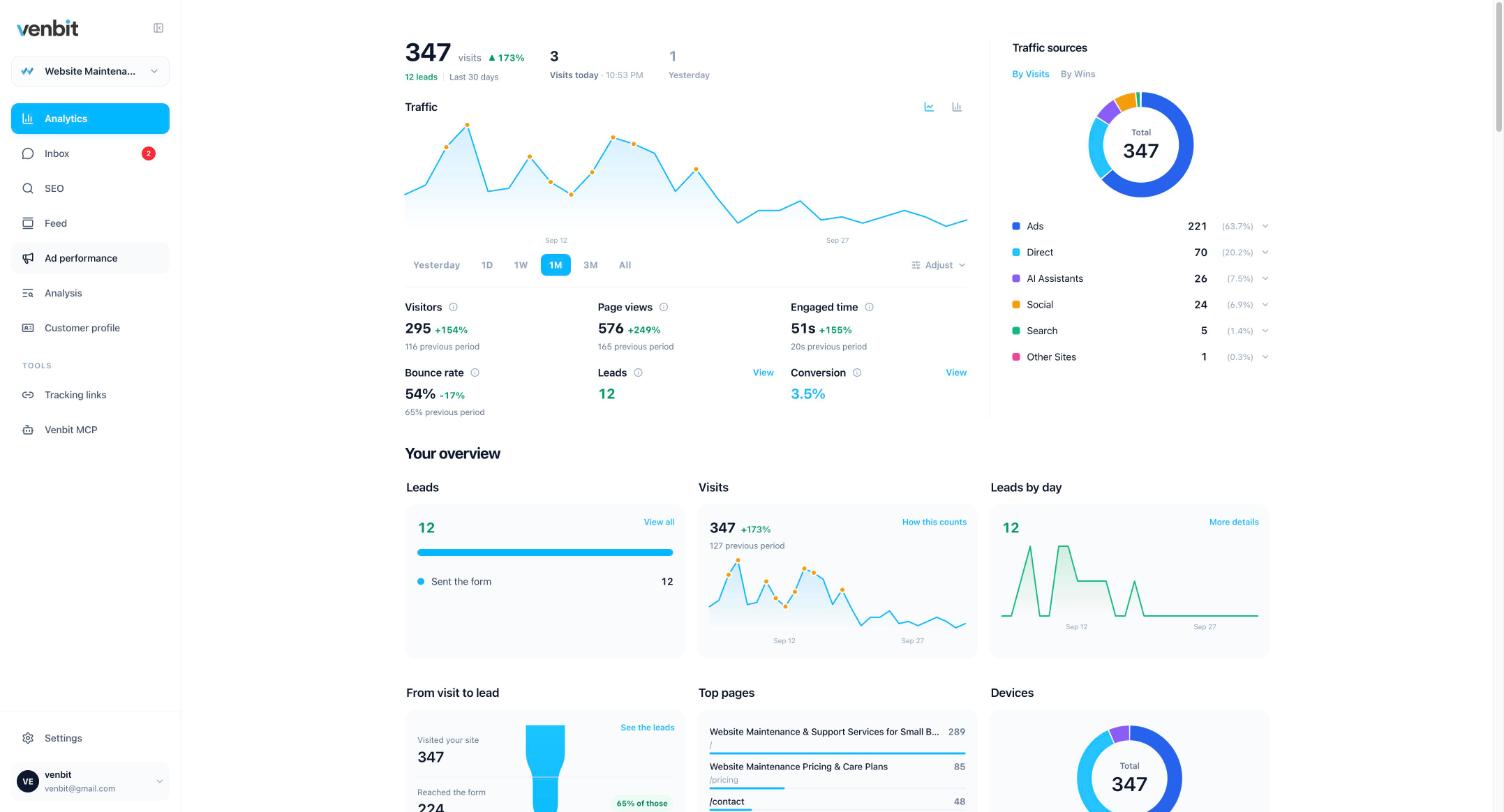
The dashboard's sources chart is the same information added up. On the demo site the last 30 days read Ads 221, Direct 70, AI Assistants 26, Social 24 and Search 5, against 12 leads. Useful for proportion, useless for a single enquiry.
The campaigns section does the join. Website Maintenance Campaign 1 on Meta brought 137 visits and 7 leads, which the screen reads as 5% got in touch; the same campaign on Instagram brought 61 visits and 2 leads, 3%. Those are leads counted on the site, from the click landing onward, so they are clicks that reached the page and what the visitor did next. The tracker does not see what you paid, so there is no cost per lead here. Whether the ads are working is still answered, in leads and in the rate at which clicks became them.
Which page a lead came from
Every row in the inbox names the page the form was on. The lead opened above was sent from the home page, where the demo site keeps its quote form. On a site with a contact page and six service pages, this column tells you which service page is doing the work, and the trail tells you which pages were read on the way to it.
Read the two together. The customer profile tab on the demo site says a typical lead reads 4 pages and spends about 5 minutes 26 seconds before writing, and 75% came from the ads. A lead that read one page and wrote is a different customer from one that read the pricing page, the reviews and the service area first, and the trail shows which one you have in front of you.
A trail names the fields a person touched by their labels. Started filling the quote form means a field was focused, nothing more. What was typed is on the lead in the inbox, which sits behind the leads permission, and the trail shows it only to the people who hold that permission.
Phone taps and email clicks are leads too
A tap on your phone number lands in the same inbox as the forms, with its page and its source. A click on your email address counts as a lead on that visit and sends a push, but has no row of its own in the inbox. The push for them reads Someone just tapped your phone number, or Someone just clicked your email address. A tap is intent, not a connected call: the tracker knows the number was tapped on that page at that moment and nothing about whether anyone answered.
That matters for source tracking because on a trade site a good share of the enquiries never touch a form. If only the forms are counted, the source report describes the minority of your leads. What counts as a lead on your site is a setting worth deciding on purpose: a page reached, a button, a form, with the phone and the email as signals the tracker already records.
Tracking form submissions in Google Analytics
Google Analytics will count a form submission once somebody sets it up as an event and marks it as a key event, and it will split that count by channel group. Its policies forbid sending it anything that identifies a person, so the name, the email and the message never arrive, and a count by channel is as close as it gets. For a marketing team that lives in GA4 that is enough. For an owner asking which enquiry came from which ad, it is a table of totals. What Google Analytics will and will not tell a small business covers the rest.
The other common method is a hidden field in the form that copies the landing address or the campaign into the submission, so the source arrives inside the email. It works, and it fails quietly when the form is rebuilt, the plugin updates, or the email never arrives. It also tells you the source of the submissions and nothing about the visits that did not submit, which is where the money is being lost.
The same inbox on your phone
The iPhone app shows the same leads with the same source line, and a push arrives the moment one lands. Each lead can be marked new, contacted, won or lost, with a note kept on it, so by the end of a month the inbox is also the record of which sources produced the leads you won, which is the number that decides next month's spend.
Related services
More on reading your website's numbers
Every question in this series, from Website Analytics for Small Business Owners.
Leads inbox4
- Website Traffic but No Leads? Where the Visits Stop
- How to Track Where Website Leads Come From, Lead by Lead (you are here)
- How to Track Phone Calls From Your Website Without a New Number
- Get Notified When Someone Fills Out Your Contact Form, in Seconds
Ad performance4
SEO tracking3
Visitor behaviour4
Feed and notifications3
Goals and measurement4

Tony Carnevale
Founder, Venbit
Tony started Venbit in Mill Creek, WA in 2011 and still does the work: web design, SEO, and the website analytics product the company builds and runs for its own clients. The numbers and screens in his articles come from that product, not from a content mill.