 Tony Carnevale
The short answer
A lead is a visit in which someone sent a form you can see, landed on a thank-you page you set, tapped your phone number, clicked your email address, or completed a goal you named. One visit counts once. The only dollar figure on a lead is the job value you type when you mark it won, never measured revenue.
Key takeaways
- Which forms reach the inbox and which count as a win are separate ticks, so a newsletter box can reach the inbox without counting as a lead.
- Started a form means a field was focused. It is a funnel step, never a lead.
- A phone tap is intent, not a connected call. It counts as a lead and the screen says what it is.
- A goal is a page reached, a button clicked or an event fired. Pick the kind of business and tick the goals in plain words.
- There is no ad spend in the data, so there is no cost per lead or return on ad spend; both would need your bills.
- In GA4 the same idea is a key event; Google called them conversions until 2024.
A lead is a visit in which someone did the thing your website exists for: sent a form you can see, landed on a thank-you page you set, tapped your phone number, clicked your email address, or completed a goal you named, such as reaching a booking page. One visit counts once, however many of those it does. Decide that definition once and every number downstream, conversion rate, the ad verdict, the value of a page-one ranking, is built on the same word.
Most arguments about whether a website is working are arguments about this definition. The ad platform counts one thing, the analytics another, and the owner counts the phone ringing.
The definition, as the dashboard states it
A visit where someone completed a lead action: sent a form we can see, landed on a thank-you page you configured, or completed a goal you defined. One visit counts once no matter how many times they convert.
Three phrases in that are doing work. A form we can see means a submission the tracker observed on the page, and a submission stays an attempt until the form confirms it was accepted. A thank-you page you configured means the address people land on after a form or a booking, which you tell the product once. And one visit counts once means a person who sends the form and then taps the phone number is one lead, which keeps the count from flattering itself.
The phone tap and the email click are in the count too. They are recorded directly by the tracker as lead signals, which is why they do not appear in the quoted definition as goals: there is nothing to configure.
Forms, taps and clicks
The form is the lead most sites live on, and the settings for it are short. Which forms reach the inbox and count as a win is a list of your pages; on the demo site the contact form at /contact is ticked for both. Thank-you pages are listed beside it. There is a switch to capture typed form values, so a lead opens with what the person wrote, and a switch to ignore forms nobody typed in, which keeps a submission with nothing in it out of your count.
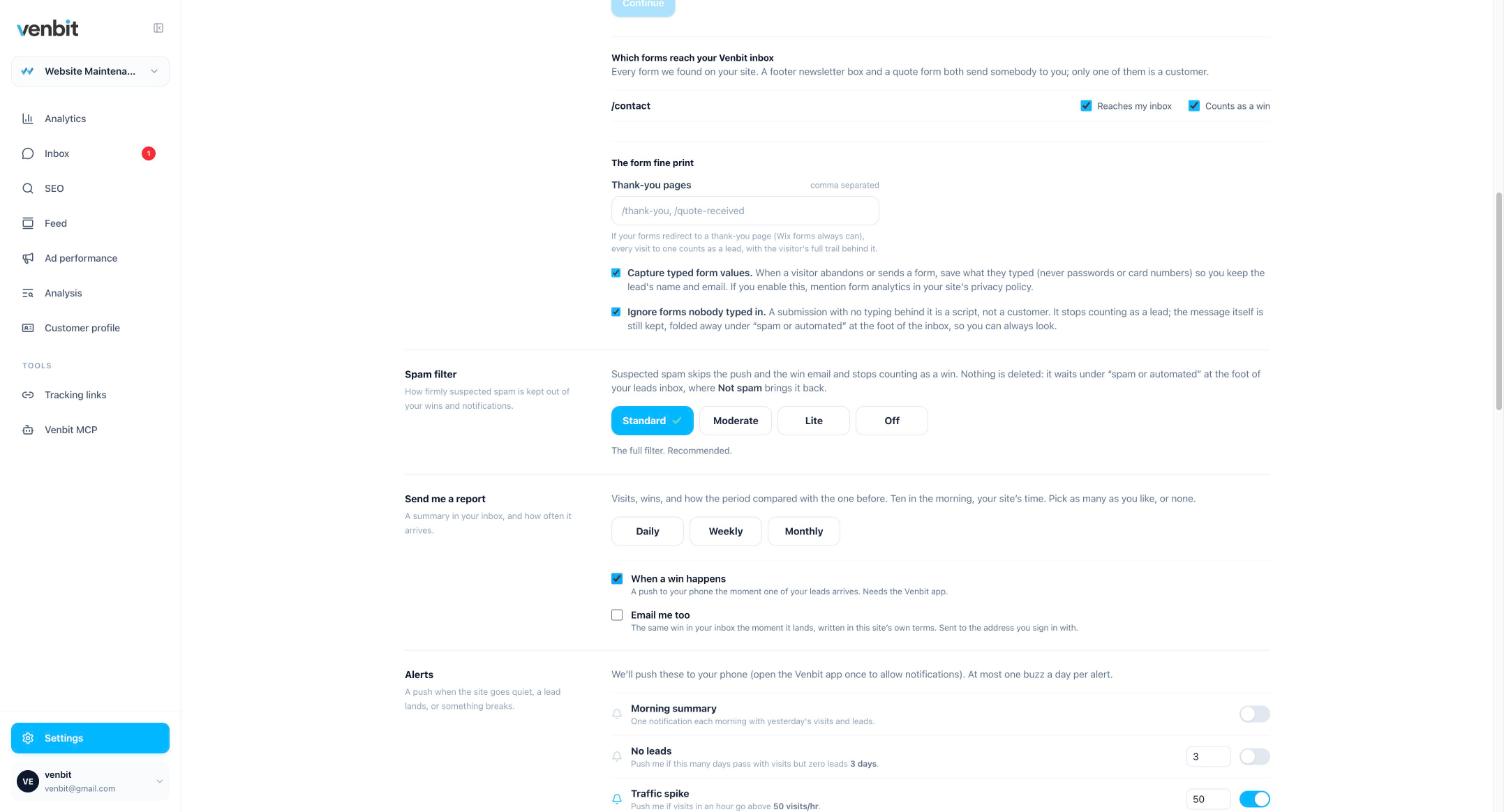
Two things are measured here that are easy to mistake for leads. Started a form means a field was focused, which is a tap or a click into it, and says nothing about whether anything was typed. It is a useful step in a funnel and a useless lead count. And a phone tap is intent, not a connected call: the tracker sees the tap on the number and cannot see whether the call went through. I count taps as leads because a person who taps a number on a phone meant to call, and the screen says tapped so nobody reads it as calls answered.
Spam is judged at the moment a form arrives and again later, because a filter only knows the pitches it has seen. A submission the filter let through on Monday can be re-judged by Thursday's filter, and a session that gives itself away as a headless browser after the form is sent is pulled from the count. The filter has four settings, standard, moderate, lite and off, and off means you asked for no filter at all.
Typed values are gated. The trail of a visit shows which fields a person filled in, and what they typed is kept with the lead; anyone you invite to see the site without the leads permission sees that a form was sent and nothing of what was in it. Each lead also carries its source and the page it was sent from, which is how you find out where your leads come from without hidden fields or a tag manager.
Conversion goals: a page reached, a button clicked
Everything beyond a form and a tap is a goal you name. A goal is a page reached (a booking confirmation, a directions page), a button or link clicked (a Book now button, a link out to your online store), or an event your developer fires, and each goal has a switch for whether a completion counts as a lead. In Venbit's analytics you do not set those up as patterns. You pick the kind of business the site is for and get the handful of goals that kind of site has, in plain words, then tick the ones that apply and fill in the missing piece, a page address or the words on a link.
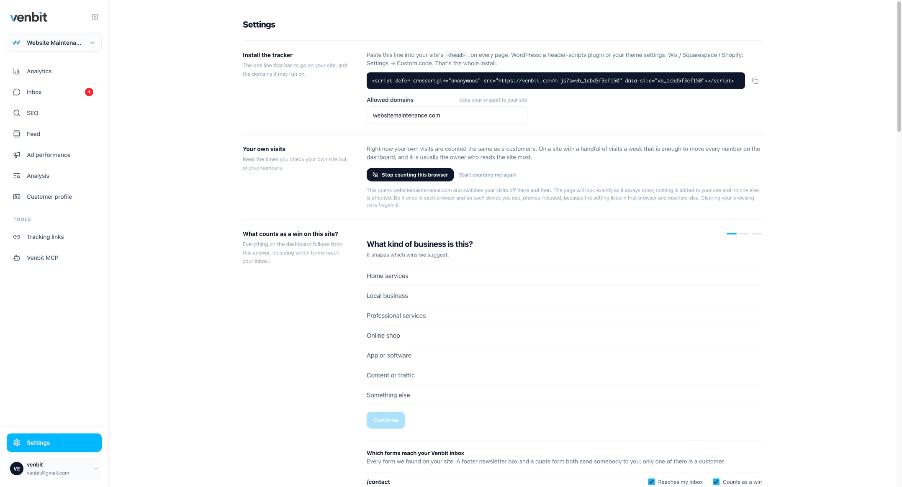
A plumber knows that people ring us. Nobody who runs a plumbing company knows that this means a click goal matching tel, and the old screen asked for the second thing. The phone and the email are not goal rows at all; the tracker records those taps directly, so they are lead signals you switch on. The rest become goals.
When a goal completes, the visit is marked converted at that moment, and the same rule that counted it is the rule that marks the winning step in the visit's trail, so the two can never drift apart. The phone gets a push through the iPhone app. On a site that also counts forms as leads it reads New lead on your site, someone just completed the goal, by its name; on a site that counts only goals it reads Goal completed on your site, or the goal's own sentence in the past tense. Goals are written about anyone, someone taps through to the booking page, because the person has not told you who they are yet.
How much a lead is worth, and who typed the figure
When you mark a lead won, you can type what the job was worth. Be clear about what that is: a figure you typed, against one lead. It is not measured revenue, and the product never claims it is. There is no ad spend in the data either, so you will not see a cost per lead or a return on ad spend; both would need your bills, and a number printed from a guess is worse than no number.
The value per month on the SEO screen is a different figure and it is worth knowing where it comes from. It is what the clicks a ranking brings would cost to buy at the price Google charges advertisers for that search: how many people search it, the share who click a result in that position, and the cost of one of those clicks. It is an estimate of a bill avoided, never revenue, and the screen says so.
So the honest way to judge a lead's worth is still backwards from a job. If a typical job is worth a certain amount to you and one enquiry in four becomes a job, a lead is worth a quarter of that. Write it down, mark the won ones with what they brought in, and whether your Google Ads are working becomes a question you can answer from the leads each campaign produced.
Where the count will still differ from the ad platform
Google Ads and Meta count conversions with their own tag and their own rules about which click gets the credit and for how long after it. This product counts a visit that reached the site and became a lead as defined above, with bots dropped first. The two numbers will not match, and the gap has reasons that are worth knowing before anyone argues over it. I went through them in why Google Ads conversions do not match analytics.
Goal or event, in Google Analytics terms
People searching for conversion goals are using the vocabulary of the old Google Analytics. In GA4, Google's documentation calls the actions that matter key events (they were called conversions until 2024), and a key event is any event you mark as one. The idea is the same as a goal here: an action you name. The difference is who it is written for. GA4 asks you to find an event and mark it; this asks what the site is for. If you already run GA4, what it will and will not tell a small business is the honest read, and the two can run side by side.
Reading the funnel once the definition is set
With a lead defined, the overview reads as a sentence. On the demo site: 347 visits, 224 reached the form, 13 sent it, and the lead count for the period is 12, every one of them Sent the form. Two hundred and twenty-four people reaching the form and thirteen sending it is the number I would work on, and it is a number you only get once the form is the thing you are counting.
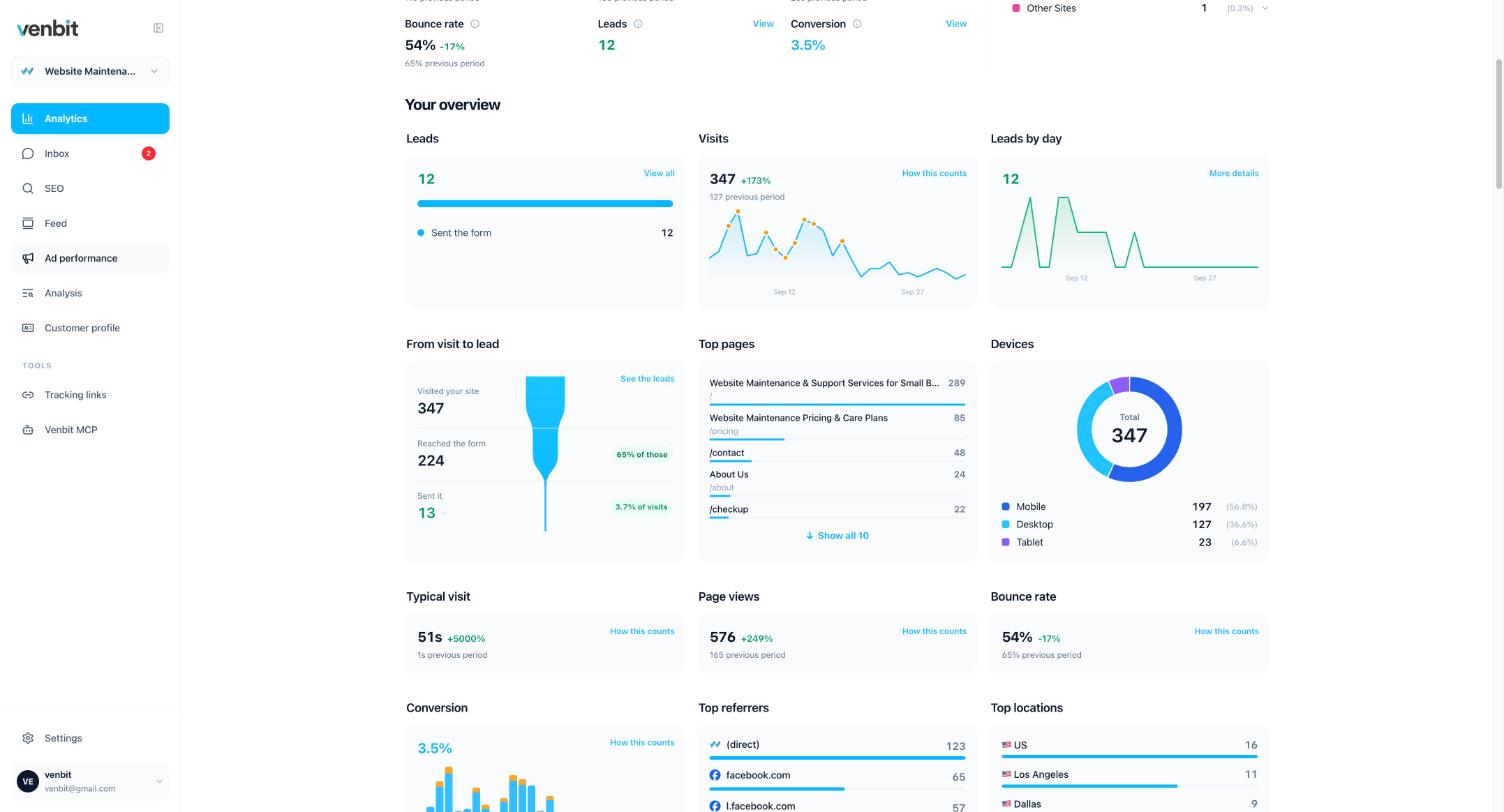
The devices chart on the same screen, 197 mobile, 127 desktop and 23 tablet, is the last reason to get the definition right. A form that is awkward on a phone loses most of its leads on the device most visitors are holding, and you only see that loss if the form is what you are counting.
Related services
More on reading your website's numbers
Every question in this series, from Website Analytics for Small Business Owners.
Leads inbox4
Ad performance4
SEO tracking3
Visitor behaviour4
Feed and notifications3
Goals and measurement4
- What Counts as a Lead on Your Website? Setting Conversion Goals (you are here)
- What Is a Good LCP Score, and Whose Phone Measured It?
- How Much of My Website Traffic Is Bots? How to Tell and What to Do
- Where Do My Best Customers Come From? Your Leads by Location

Tony Carnevale
Founder, Venbit
Tony started Venbit in Mill Creek, WA in 2011 and still does the work: web design, SEO, and the website analytics product the company builds and runs for its own clients. The numbers and screens in his articles come from that product, not from a content mill.
Sources
- Venbit metric definitions: lead (conversion), conversion
- Google Analytics Help, [GA4] Key events
- Google, More insightful measurement across Google Ads and Analytics (March 21, 2024)