 Tony Carnevale
The short answer
Google Ads counts whatever it can attribute to its clicks, including conversions that happen days later and are dated back to the click, and on some campaigns conversions nobody clicked for. Your website counts the people who arrived with a Google click id and sent a form or tapped the phone. That smaller number is the one to spend against.
Key takeaways
- Google Ads reports a conversion on the date of the click, inside a window you set, so a closed month keeps gaining conversions for weeks.
- View-through conversions credit an ad that was seen and never clicked. No click id ever reaches your site for those, so your site will never count them.
- Your site can see the gclid on the landing URL, what the visit did, and whether it became a lead. It cannot see spend, so it computes no cost per lead.
- Agree on what a lead is before comparing counts. Most disputes are two people using the word for two different things.
- On the demo site the Ad performance tab shows 221 ad clicks and 9 leads, a 4.1% lead rate, with a one-paragraph verdict under the tables.
Google Ads says one number. Your analytics, or your inbox, says a smaller one. Both are counting honestly and they are counting different things. Google Ads counts conversions it can attribute to one of its own clicks, under rules it sets: a form sent nine days after the click is dated back to the day of the click, and on some campaign types an ad that was seen and never clicked can earn a conversion too. Your website counts the people who arrived from an ad and then did something you can see.
The second number is the one to spend against. It is smaller, it is yours, and nobody who sells you clicks had a hand in it. Once you can read it, the monthly report becomes a conversation about specific leads instead of an argument about totals.
What Google Ads is counting
Google's own help pages are clear about the rules, and the rules explain most of the gap. A conversion is reported on the date of the click that led to it, not the date it happened. Someone clicks on the 28th and sends your form on the 6th of the next month, and that conversion lands in the earlier month. So a report pulled on the 1st and the same report pulled on the 20th show different totals for the same period, and both are correct by Google's definition.
The click-through conversion window can be set as long as 90 days. A longer window means more conversions credited to ads, including from people who came back from a plain Google search weeks later and would have found you anyway.
View-through conversions are a separate column. Someone saw your ad on a Display or video placement, did not click it, and later reached your site some other way and converted. Google reports those in their own column, and a summary that folds them into the headline number is adding people who never touched the ad.
Then there is the conversion action itself. Each one has a count setting, every or one, which decides whether a person who sends the form twice is one conversion or two. And an action set up years ago can still be firing on a page that no longer means what it meant. None of this is cheating. A platform measures its own effect as generously as its rules allow and reports the result to the person paying for it.
What your website can see
Your site sees less, and what it sees is harder to argue with. When someone clicks a Google ad, Google stamps a click id on the landing URL, the gclid. Venbit's analytics keeps that id with the visit, so a paid click is counted as paid even on a site where nobody ever set up a utm tag. Meta does the same with fbclid and Microsoft with msclkid.
From there the site watches what the visit did. A second page read, the form opened, the form sent, the phone number tapped. A lead is a visit where someone sent a form the tracker can see, landed on a thank-you page you configured, or completed a goal you defined, and each visit counts once however many times the person converts. That definition is published on the definitions page and it is the same for paid and free traffic. Which platform sent each lead is its own article.
What the site cannot see is the other half of the story. It does not see impressions, or clicks Google billed that never finished loading your page, and it does not see your spend, so it computes no cost per lead and no return on ad spend. Those figures belong to the platform and I would rather leave them out than estimate them. A phone tap is recorded as intent, since the tracker cannot know whether the call connected, and bots are dropped before anything is counted.
The site's count, on a real screen
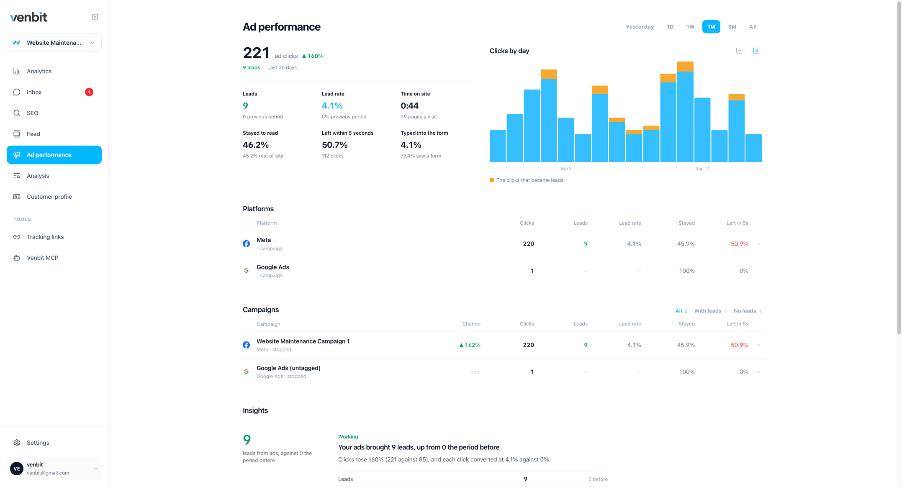
This is the Ad performance tab on our demo site, WebsiteMaintenance.com, and every number read from a screenshot on this page is from that site. In the last 30 days it recorded 221 ad clicks, up 140% on the period before, and 9 leads from them, a lead rate of 4.1%. Half the ad visitors left within 5 seconds (50.7%), 46.2% stayed to read, and 4.1% typed into the form.
The Platforms table under the chart is the referee. Meta sent 220 of those clicks and 9 leads. Google Ads sent 1 click and no leads. Nearly all of the demo site's ad clicks came from Meta in this window, so read the Meta row as the worked example. What to copy from it is the shape. Clicks that landed, the leads they became and the rate, per platform, and no platform's own conversion column anywhere on the screen.
Under the tables sits a one-paragraph verdict in plain words. On this screen it reads "Your ads brought 9 leads, up from 0 the period before." I wrote that line to answer the only question the person paying ever asks me, and it is written from the site's count.
Campaigns, one at a time
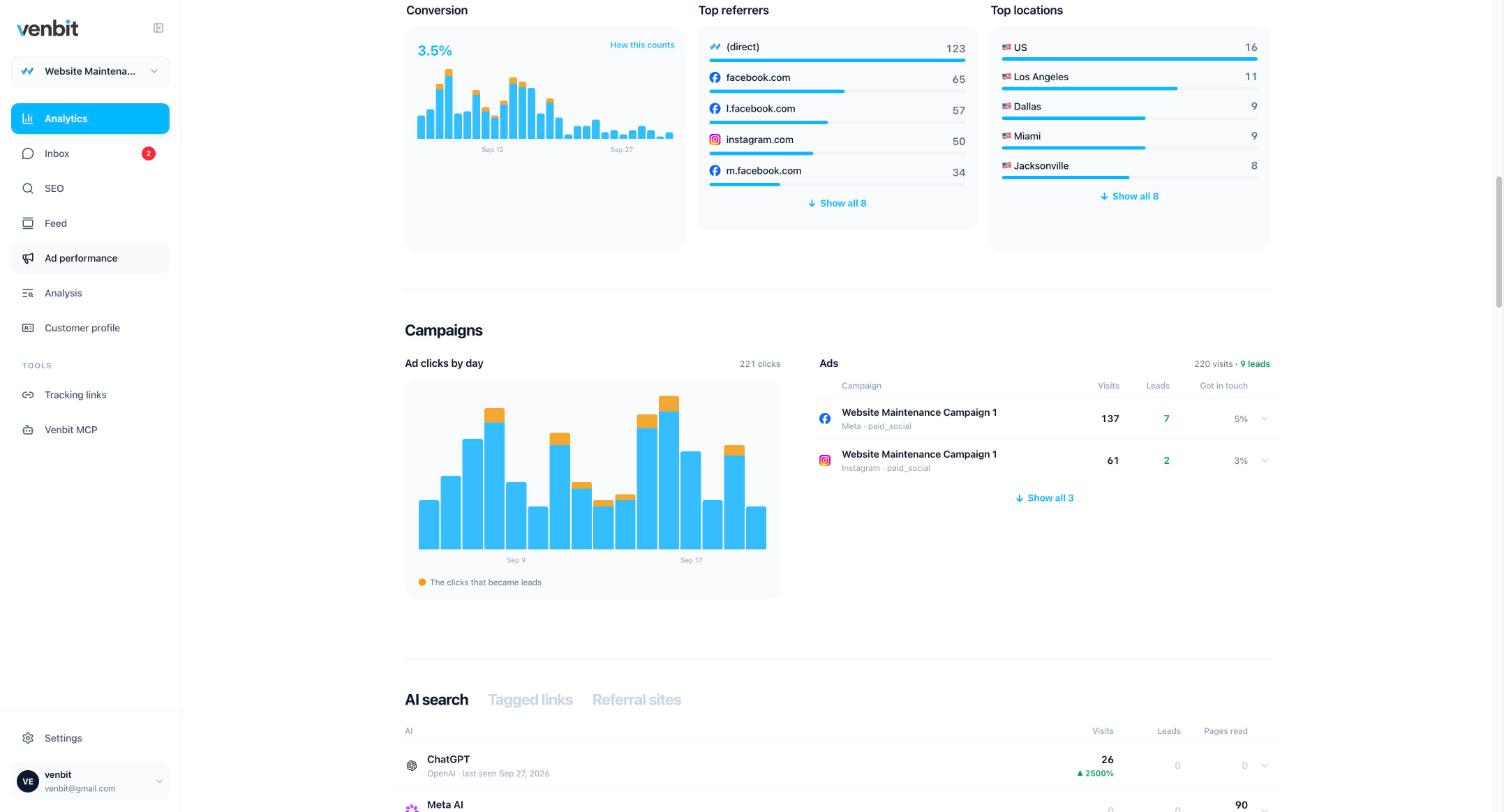
The Campaigns section breaks the same clicks down by campaign. On the demo site, Website Maintenance Campaign 1 brought 137 visits from Meta and 7 leads, so 5% got in touch, and 61 visits from Instagram with 2 leads, 3%. The orange marks on the clicks-by-day chart are the clicks that became leads.
When a platform report and this screen disagree, you hold two numbers with two definitions, and the argument becomes specific. Say the platform credits that campaign with twelve. The site says it produced seven forms you can open and read. The five in between are view-through, late conversions dated back to an earlier click, double counts, or people who converted on a later visit that arrived some other way. Each of those is a question you can put to whoever runs the account, and each has an answer.
Agree on what a lead is before you compare counts
Most of the disagreements I have sat through were two people using the word lead for two different things. The ads manager counted a conversion action set up two years earlier on a thank-you page the site no longer uses. The owner counted emails that reached their inbox. Neither count was wrong by its own definition, and the meeting went nowhere.
So decide it once. Which forms count, whether a phone tap counts, whether a chat message counts, and what a lead is worth to you. What counts as a lead on your website walks through the settings. The goal value you type there is a figure you chose, not measured revenue, and every ad number built on it inherits that.
Then take the same definition into the ads account and check each conversion action against it. If Google is counting a page view and you are counting a sent form, the gap will never close and no amount of reporting will make it.
Where the gap is honest and where it is not
Some of the difference will never go away, and that is fine. These are the ordinary causes.
- A person clicked the ad on Monday, came back from a plain Google search on Thursday and sent the form. Google credits Monday's click inside its window. Your site credits Thursday's search visit, because that is the visit that converted.
- A view-through conversion on a Display or video campaign. Nobody clicked, so no click id ever reached your site.
- Someone sent the form twice and the conversion action is set to count every submission.
- A browser setting or an ad blocker stopped one tag from loading on that visit while the other one fired. It happens in both directions.
- The visit was a bot. Your site drops it before counting. Google has its own invalid-click rules, and the two systems do not consult each other.
The gap stops being honest when it only ever runs one way and nobody can show you the leads. A report claiming twenty conversions in a month where your inbox, your phone and your calendar together show six is a report to read with the inbox open. I have not yet seen an inflated report survive the question "show me the twenty".
How to count ad leads yourself
On the Venbit app for iPhone the Ad performance screen opens to the verdict paragraph, then clicks by day, then the platforms and campaigns, the same numbers the web portal shows. Open it on the day the agency report arrives and read the two side by side.
Check whether the site's lead count moved in the same direction as the platform's, and whether the lead rate for ad visits sits above or below the site's conversion rate for all visits, which the dashboard shows. Then open the leads from that platform and ask whether they are people you would call back. A conversion that turns out to be spam is a cost with nothing on the other side.
If the ads are new to you, how to tell if your Google Ads are working covers the first month, before there is enough data to compare anything.
And if the analytics in question is Google's own, what Google Analytics will and will not tell a small business explains why GA4's conversion count is a third number again, dated to the day the conversion happened and attributed by its own model.
Related services
More on reading your website's numbers
Every question in this series, from Website Analytics for Small Business Owners.
Leads inbox4
Ad performance4
- How to Know Which Ad a Lead Came From: gclid, fbclid, msclkid
- Google Ads Conversions Don't Match Analytics: Which Count to Trust (you are here)
- Google Ads vs Facebook Ads for Small Business Leads: Your Own Numbers
- Track QR Code Scans to Leads: Tracking Links for Flyers and Posts
SEO tracking3
Visitor behaviour4
Feed and notifications3
Goals and measurement4

Tony Carnevale
Founder, Venbit
Tony started Venbit in Mill Creek, WA in 2011 and still does the work: web design, SEO, and the website analytics product the company builds and runs for its own clients. The numbers and screens in his articles come from that product, not from a content mill.