 Tony Carnevale
The short answer
Put a tracking link behind the QR code or in the post instead of your bare address. Every click charts under the name you gave it, the visits land in your campaigns beside your ads, and each lead in the inbox carries that name as its source. Without one those visits arrive as direct, which is no answer at all.
Key takeaways
- A QR scan, a typed address from a flyer and a tap from inside many apps all arrive with no referrer, so they are filed as direct. Direct is the absence of a source.
- A tracking link is a short address of your own, such as vnbt.app/spring-mailer, that opens the page you choose and files the visit under the campaign name you gave it.
- Each link counts its clicks and, separately, the visits that reached your page and the leads they became, so the gap between a scan and a loaded page is shown instead of guessed. Clicks from link scanners are named as such.
- Point the QR code at the short address. Any QR generator will do, because the tracking happens at the link.
- One link per placement. The flyer, the van, the bio and the mailer each get their own name, or you will never know which one worked.
A QR code tells you nothing on its own. The camera app reads it, opens your address, and the visit arrives at your site looking exactly like someone who typed the address by hand. To know whether the flyer, the mailer or the Instagram post brought a customer, the address behind it has to carry a name, and the tracker has to keep that name all the way to the lead.
That is what a tracking link does. You make a short address of your own, give it a name, point it at the page you want people to land on, and print or paste that instead of your bare domain. Every click charts under the name, the visits sit in your campaigns beside your ads, and when one of those visitors sends your form, the lead in the inbox says where it came from.
Why a scan shows up as direct
When a browser follows a link from one page to another it passes along the address of the page it left, the referrer. That is how analytics knows a visit came from Google or from Facebook. A camera app opening a URL passes nothing. A typed address passes nothing. A tap inside many apps passes nothing either, because the app opens the page in its own browser and strips the referrer on the way out.
All of those land in the same bucket, direct, which means the visit arrived with no referrer. Direct is a gap in the data, not a source. On the demo site the sources donut shows 70 direct visits in the last 30 days, and nothing in the data can say how many of those were a flyer, a saved bookmark, a text message or a scan.
Tags on the end of the URL are the fix, because they travel inside the address itself and survive a camera app or a copied link. The old way to add them is by hand.
UTM parameters, explained in one paragraph
A UTM tag is a few extra words after a question mark in the address: utm_source says where the link was placed, utm_medium says what kind of placement it was, utm_campaign names the push. Any analytics tool reads them. The trouble is that a hand-built tag is a long ugly address that nobody can print on a flyer or read out loud, and after a few months of making them up on the spot you have utm_source=facebook, Facebook and FB as three different sources for one place. People keep spreadsheets to stop that happening, and then they stop keeping the spreadsheet.
A tracking link makes the tag for you behind a short address and keeps the names consistent, because the name is chosen once when the link is made.
Making a tracking link
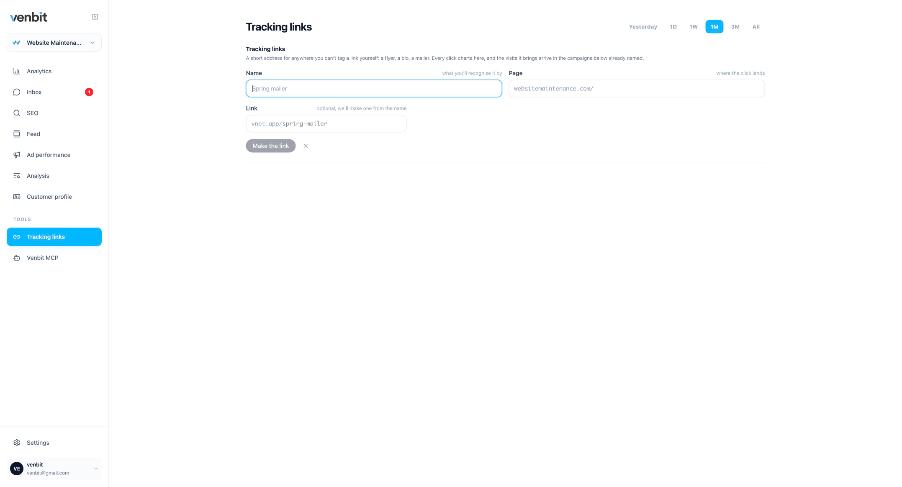
In Venbit's analytics the Tracking links screen asks for two things: a name and the page the link should open. The demo site's example is a link named Spring mailer that opens the page you pick, and the short address it produces is vnbt.app/spring-mailer. The screen describes itself as a short address for anywhere you cannot tag a link yourself: a flyer, a bio, a mailer. Every click charts there, and the visits it brings arrive in the campaign as the name you give it.
Then make the QR code point at the short address, not at your domain. Any QR generator will do, because the tracking happens at the link, not in the code. Print it, and when the mailer lands the clicks start charting under Spring mailer.
Make one link per placement. The flyer in the hardware store, the decal on the van, the Instagram bio and the April mailer each get their own name. One shared link tells you that print works in general, which is not a decision you can act on. Four links tell you the van brought two leads and the hardware store brought none, and next spring you know where the flyers go.
How to know if the mailer worked
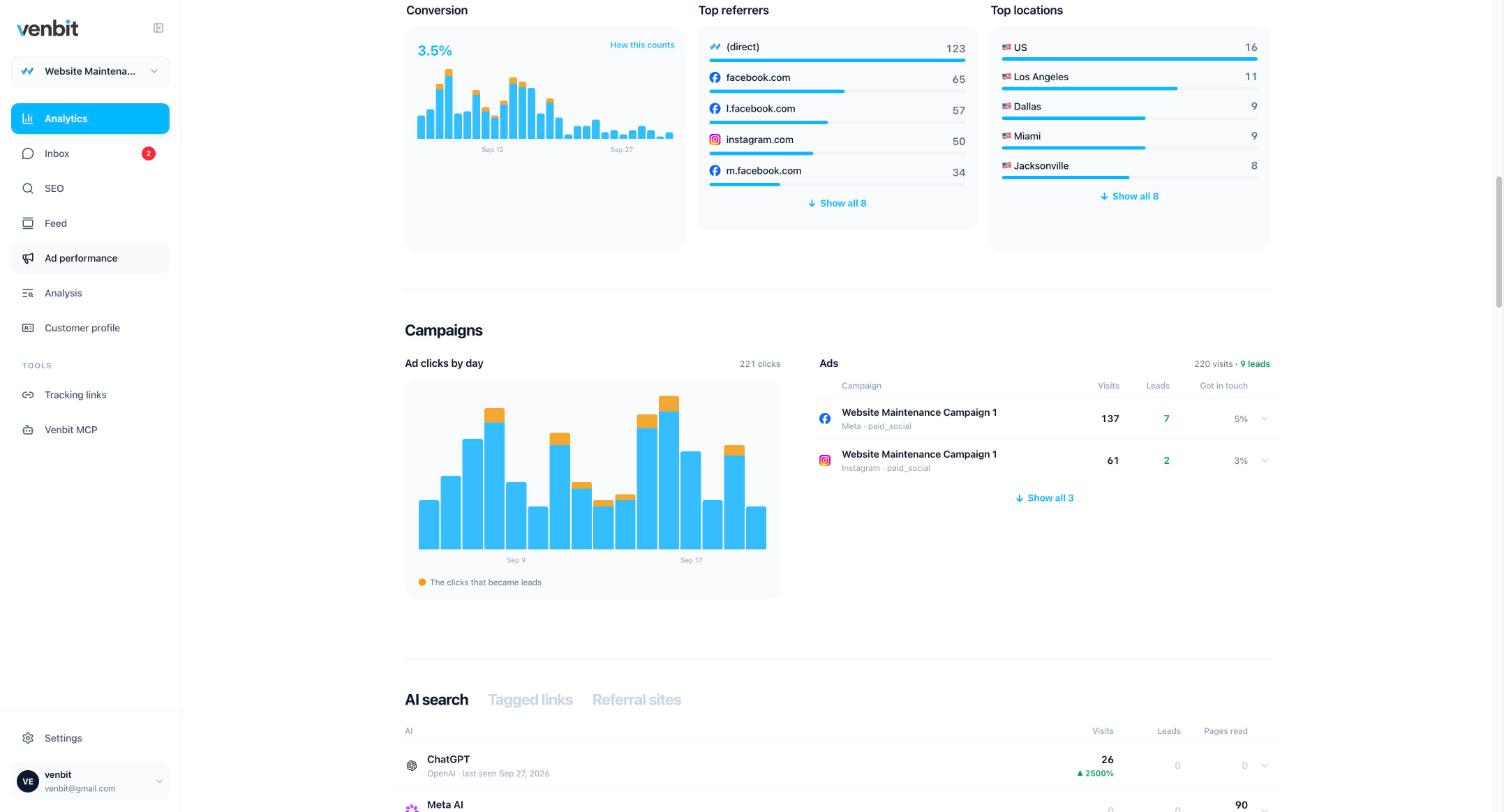
A tracking link's visits land in the Campaigns section, the same table that holds your ads. Every number read from a screenshot on this page is from our demo site, WebsiteMaintenance.com. On it the table shows Website Maintenance Campaign 1 with 137 visits from Meta and 7 leads, and 61 visits from Instagram with 2 leads. A mailer link sits in that list under the name you gave it, with its own visits, its own leads and the share that got in touch.
The chart above the table is clicks by day, with the clicks that became leads marked in orange. For a mailer that chart is the delivery curve: nothing, then a spike the week the envelopes land, then a tail. If the spike never comes, the mailer did not get scanned, and no amount of staring at the design will change that.
The same table reaches your phone. The Venbit app for iPhone shows the campaigns with their leads, and a push arrives the moment a lead does, so you learn the mailer worked on the day the first envelope was opened instead of at the end of the month.
A tagged visit is also sorted for what it is. Some tools list anything that arrives with a utm_source as an ad campaign, which is how a Google Business Profile link tagged as a listing, or a link ChatGPT hands out with its own utm_source on it, ends up in an ad report nobody paid for. The campaigns table tells those apart, so the mailer row is the mailer.
The lead, with the flyer's name on it
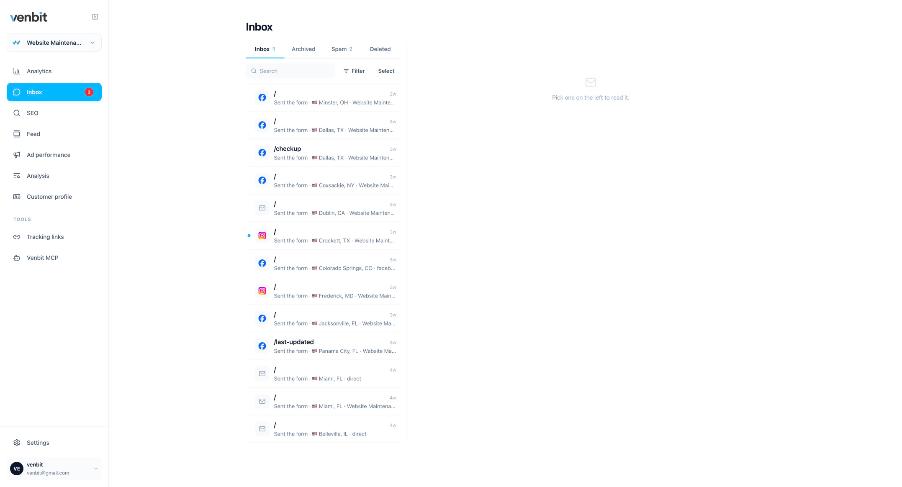
This is the part the click counters leave out. A QR service will tell you a code was scanned forty times and stop there. The inbox shows every form sent, phone number tapped and email address clicked on the site, each with the page it came from, the town and the source. On the demo site the sources in the list read Website Maintenance Campaign, Instagram and direct. A lead that arrived through the Spring mailer link carries that link's campaign name instead of direct.
So the question changes from how many scans to how many customers. How to track where your website leads come from covers the inbox and the trail under each lead in full. The short version is that the source is stored with the lead the moment it arrives.
What the count can and cannot tell you
A tracking link counts two things and keeps them apart. The click is counted at the link itself, the moment the short address is opened, and clicks from link scanners, the bots that preview an address before a person sees it, are named as such beside the count. The visit is counted when your page loads with the tracker on it, and bots are dropped from that side before anything is counted. So a link's row reads clicks, then visits, then leads, and a scan where the person closed the browser before the page finished is a click without a visit. The gap between those two columns is a fact you can see instead of a mystery.
The town on each visit comes from IP geolocation and is approximate. For a mailer that is still useful: if you mailed three zip codes and the visits under that campaign come from those towns, the envelopes reached the people you paid to reach. A phone tap from one of those visits is intent, not a connected call, and the tracker never claims otherwise. And a lead is one visit that converted once, however many forms the person sent.
The link also cannot tell you about the person who saw the flyer, remembered the name, and searched for you on Google a week later. That visit arrives as search. Some of what a flyer earns will always land there, which is a reason to read the search row in the month after a mailer too.
Where to put a tracking link
Anywhere you cannot click a link yourself, or cannot control the referrer. The ones I have seen pay for themselves on client sites, in no particular order.
- The QR code on a flyer, a door hanger, a yard sign, a postcard or a trade show banner, one link per print run.
- The decal on the van, where the short address is readable at a stop light and the QR is not.
- The one link an Instagram or TikTok bio allows.
- A Facebook or Nextdoor post, where the in-app browser strips the referrer.
- A radio or podcast read, where vnbt.app/spring-mailer can be said aloud and your real address cannot be heard correctly.
Posts on your Google Business Profile are another good place, since the profile's own tagging is a listing and not a campaign, and a tracking link in the post lets you see which post brought the form. Setting up the profile properly comes before that, and it is free.
Once the mailer and the ads are both in the campaigns table under their own names, the comparison between them is the same three columns. Comparing Google Ads and Facebook Ads on your own leads shows how to read those columns, and a mailer row reads exactly the same way.
Before any of this spending, finish the local SEO checklist. The free listings bring leads with no envelope to print, and a mailer works better when the person who scans it finds a complete profile and recent reviews waiting.
Related services
More on reading your website's numbers
Every question in this series, from Website Analytics for Small Business Owners.
Leads inbox4
Ad performance4
- How to Know Which Ad a Lead Came From: gclid, fbclid, msclkid
- Google Ads Conversions Don't Match Analytics: Which Count to Trust
- Google Ads vs Facebook Ads for Small Business Leads: Your Own Numbers
- Track QR Code Scans to Leads: Tracking Links for Flyers and Posts (you are here)
SEO tracking3
Visitor behaviour4
Feed and notifications3
Goals and measurement4

Tony Carnevale
Founder, Venbit
Tony started Venbit in Mill Creek, WA in 2011 and still does the work: web design, SEO, and the website analytics product the company builds and runs for its own clients. The numbers and screens in his articles come from that product, not from a content mill.