 Tony Carnevale
The short answer
The fastest alert for a contact form is a push to your phone the moment the form is sent, with the person's name in it and the message one tap away. Venbit sends it from the website's own record of the submission, outside the email path, so it arrives even on the day the form's email does not.
Key takeaways
- The push reads New lead on your site, then who just sent your form. A tap opens the lead with the message and the trail of the visit.
- It comes from the website's own record of the submission, so a broken form email does not stop it.
- Turn it on in Settings with the when a win happens switch. Tick email me too if you want a copy by email.
- Each form on the site is set to reach the inbox and count as a win, or not, so a newsletter box does not wake you.
- Phone taps, email clicks and goals you define arrive the same way, with their own wording.
- The no leads after N days alert is the one that catches a form that silently stopped working.
The alert you want reads like this on your lock screen: New lead on WebsiteMaintenance.com, then the person's name and just sent your form. A tap opens the lead with what they wrote, the page it was sent from, the source of the visit and the pages they read first. It arrives seconds after they press send, while they are still on your site.
I built it that way because email is the weakest link between a customer and a reply. The push is part of Venbit's analytics, and the screens below are from the demo site, WebsiteMaintenance.com.
When the form submission notification does not arrive
Most contact forms deliver by email, and email is where leads go missing. The message lands in spam, the sending address fails a check at your mail provider, a plugin update breaks the send, or it arrives in an inbox nobody opens until Monday. The customer saw a thank-you message and assumes you have it.
The tracker stores every form submission on the site itself, outside the email path, with the page and the source it came from. The push comes from that stored copy. So when a customer says they filled out your form last week and you have nothing, you can look, and the lead is there whether or not the email ever was.
The settings screen also lists the forms found on the site's pages, by page. On the demo site that list has /contact set to reach the inbox and count as a win. If a form you know exists is missing from that list, the scan of your pages did not find it, and a test submission is how you find out whether the tracker does.
What the notification says
The wording is flat on purpose, because somebody reads it on a lock screen. A form sent reads New lead on your site's name, then the person's name and just sent your form, or Someone just sent your form when the form had no name field. A tap on your phone number reads Someone just tapped your phone number, and a click on your email address reads Someone just clicked your email address. A thank-you page you named reads Someone just reached your thank-you page. A goal you defined, such as a booking page reached, reads Someone just completed, then the goal's name in quotes.
The push names the person when the form had a name or email field, and the message is one tap away on the lead. A tap carries no message, because a tap is a person reaching for the phone and nothing more. The push tells you it happened and the lead tells you on which page.
Turning on the push notification on your iPhone
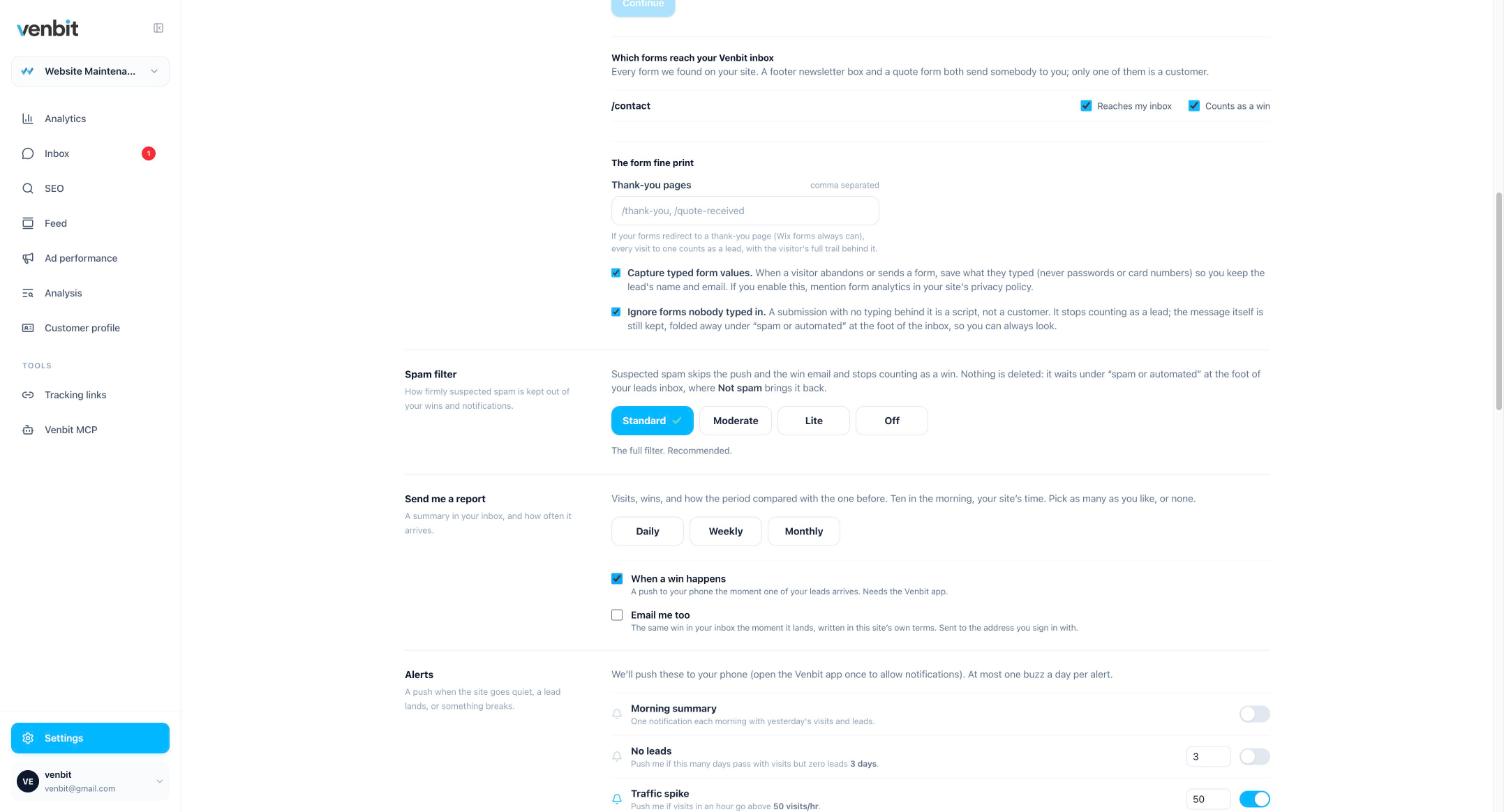
Two things have to be true. The tracker is on the site, which is one script tag that we paste in or you do. And the Venbit app is on your iPhone, signed in to the site. Then, in Settings, the when a win happens switch sends the push, and the email me too box sends the same alert by email for anyone who wants both.
Above those switches is the list of forms found on the site's pages, and each one is set to reach the inbox and to count as a win, or not. A newsletter box does not need to wake you. The fine print under the list covers thank-you pages, whether typed values are kept, and a rule to ignore forms nobody typed in, which is the first line of defence against bot submissions.
The spam filter has four settings: Standard, Moderate, Lite and Off. A submission the filter judges as spam goes to the Spam tab of the inbox with no push. The filter also looks again at stored submissions with what it has learned since, so a form-blast pitch that slipped through once does not keep its place in the inbox.
What you see when you open it
The push opens the lead. Under the message are the facts the tracker captured: where the visit came from, the town, the page the form was on, the device, how many pages they read and how long they stayed, and then the trail, which is the visit step by step. Read it before you call back. A person who read your pricing page and your reviews for six minutes before writing wants a different first sentence from one who arrived from an Instagram ad and wrote within the minute.
The town is from IP geolocation, so it is approximate. The trail names the fields they touched by label, and shows the typed values only to people who may see the leads; those values live on the lead itself.
Each lead can be marked new, contacted, won or lost, and carries a notes box. The rest of what the app shows, the dashboard and the rankings, is the same data as the web portal; the live screen is the app's alone, and the push is the reason most owners open it.
The other alerts
The lead push is instant. The rest of the alerts are about patterns, and the Settings list has five. A morning summary, which is yesterday's card pushed at 10am. No leads after a number of days you choose, which is the alert that catches a broken form, because a form that stops sending looks exactly like a quiet week until something says otherwise. A traffic spike above a number of visits an hour. An error spike. And form abandonment, which watches for people starting the form and leaving it unsent, where started means a field was focused, not that anything was typed.
Rankings and reviews arrive through the same channel. When a tracked keyword reaches page one, reaches the top three, or slips off page one, the app says so with the keyword and the positions it moved between, and sends at most one ranking push per site per day however many keywords moved. New Google reviews arrive the same way, and each kind can be muted. Ranking drop alerts and review notifications have their own article.
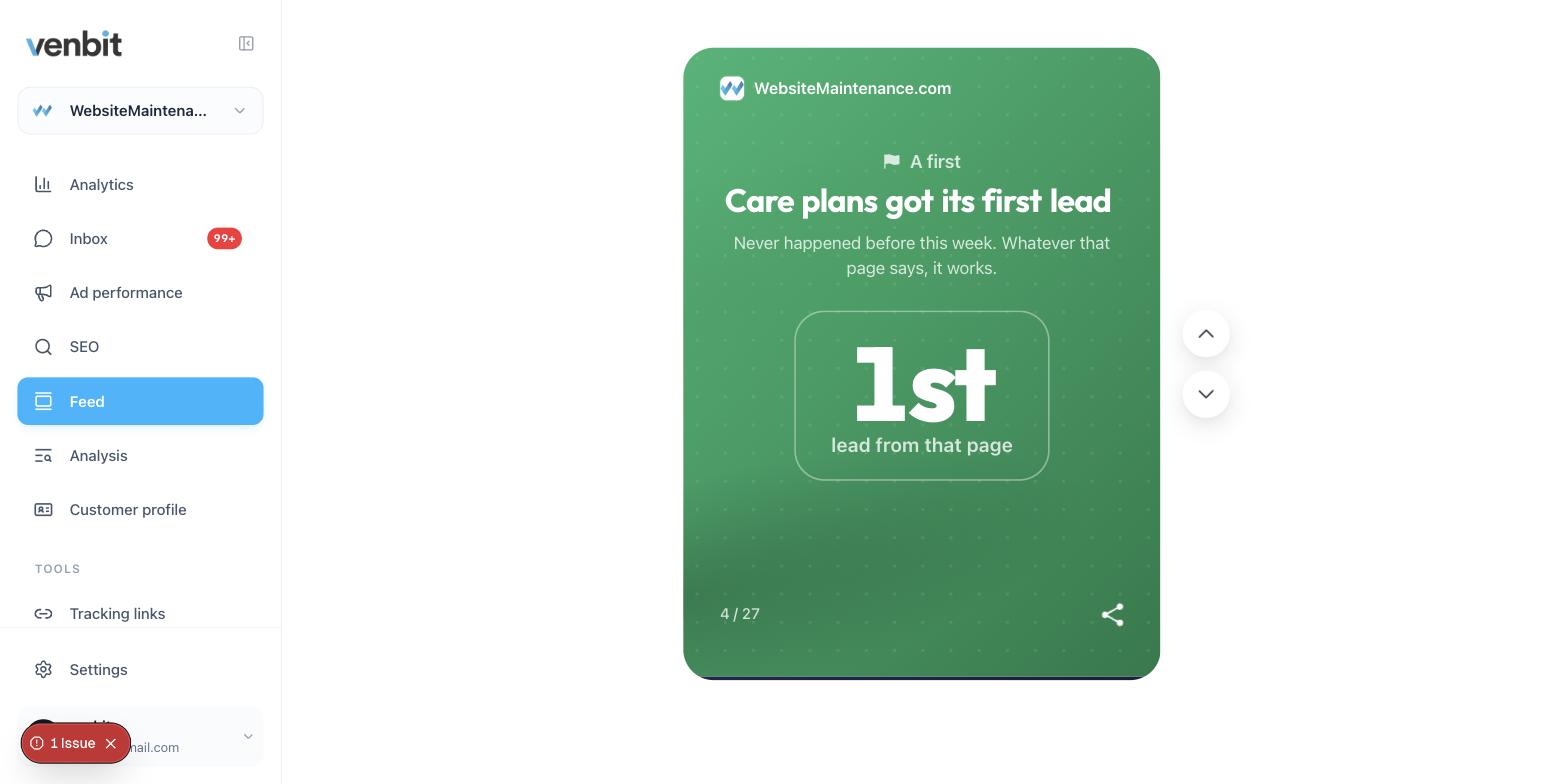
The feed is the slow channel for all of it: the period's leads, the wins and the rankings as cards you swipe through, daily, weekly or monthly, with one push when a new set is ready. The Send me a report setting picks the rhythm. I keep daily on the sites I am actively working on and weekly on the rest, because a weekly card that says nothing changed is how a channel gets muted.
How fast to respond to a web lead
The push is worth having because of what you do in the next ten minutes. The person who sent the form is still holding the phone with the problem in front of them, and the first business to answer is the one that gets to quote. Reply in that window and you are the only call they take. Reply tomorrow and they have already talked to somebody else.
That is a habit, and habits break on busy days. If replying inside the hour is beyond you most days, an automatic first reply buys the time without pretending to be you.
Where the volume is higher than one person can hold, AI follow-up can carry the first conversation until you are free. Both start from the lead arriving somewhere you will see it.
What it does not do
The push comes from the tracker seeing the form sent, so it covers the forms the tracker can see on your pages and the thank-you pages you name in Settings. It is a push to the iPhone app and, if you tick the box, an email. It does not read your email inbox and it does not know whether you replied. The spam filter has four strengths, and the one you pick decides how much reaches your lock screen.
Related services
More on reading your website's numbers
Every question in this series, from Website Analytics for Small Business Owners.
Leads inbox4
- Website Traffic but No Leads? Where the Visits Stop
- How to Track Where Website Leads Come From, Lead by Lead
- How to Track Phone Calls From Your Website Without a New Number
- Get Notified When Someone Fills Out Your Contact Form, in Seconds (you are here)
Ad performance4
SEO tracking3
Visitor behaviour4
Feed and notifications3
Goals and measurement4

Tony Carnevale
Founder, Venbit
Tony started Venbit in Mill Creek, WA in 2011 and still does the work: web design, SEO, and the website analytics product the company builds and runs for its own clients. The numbers and screens in his articles come from that product, not from a content mill.