 Tony Carnevale
The short answer
Each ad platform stamps a click id on the landing address of every paid click: gclid for Google Ads, fbclid for Meta, msclkid for Microsoft Advertising. Analytics that keeps that id with the visit, and then with the lead, can label every enquiry by platform, and by campaign and ad when the platform passes those along.
Key takeaways
- gclid means Google Ads, fbclid means Meta, msclkid means Microsoft Advertising. The platform adds it to the landing address; your site only has to keep it.
- A Meta ad click from inside the Facebook app arrives with an fbclid, no referrer and no utm tags. Drop the id and the lead reads as direct.
- The click id names the platform. Campaign, ad set and ad names come from the ad's own URL parameters, so a readable name depends on how the ad was set up.
- The clicks your site counts are clicks that reached the page, so they run lower than the clicks the platform billed.
- There is no spend in the site's data, so no cost per lead or return on ad spend is computed here.
- Flyers, bios and QR codes carry no click id. A tracking link gives them a row in the campaigns table.
Every paid click arrives at your website carrying a label. Google Ads adds gclid to the landing address, Meta adds fbclid, Microsoft Advertising adds msclkid. If your analytics keeps that label with the visit and then with the lead, every enquiry names the platform that sent it. If it throws the label away, the same lead reads as direct, and you are left guessing from the time of day.
That is the whole mechanism. The screens below, from Venbit's analytics on the demo site WebsiteMaintenance.com, follow one lead from the click id to the ad that sent it, and any number read from them is that site's.
gclid, fbclid and msclkid explained
| Parameter | Who adds it | What it tells the site |
|---|---|---|
| gclid | Google Ads, on every click when auto-tagging is on | The visit was a Google Ads click. gad_campaignid arrives beside it with Google's own campaign id. |
| fbclid | Meta, on clicks from Facebook and Instagram | The visit came through Meta. Campaign, ad set and ad arrive when the ad's URL parameters pass them. |
| msclkid | Microsoft Advertising, on clicks from Bing and its partners | The visit was a Microsoft Advertising click. |
The id is a fact about the click, not about the person. It says a Google Ads click landed, and nothing about who clicked. The campaign, the ad set and the ad are a separate matter: Meta's URL templates hand them over as numeric ids and Google sends gad_campaignid, so whether a name you can read arrives depends on how the ad was set up, and an unreadable id is treated as a fact about the tagging, not a name to print.
Why a lead says direct when it came from an ad
A Meta ad click from inside the Facebook app arrives with an fbclid, no referrer and no utm parameters. A tool that reads only the referrer sees nothing and files the visit under direct, and the owner paying Meta sees their ad traffic described as people who came straight to the site.
Direct is the absence of a referrer, not a source. A typed address, a bookmark, a link in a text message and an in-app click that strips the referrer all read the same. Keeping the click id is what pulls the paid clicks back out of that pile. An earlier version of our own channel rules read Meta ad clicks as direct, which is how I know how easy the mistake is to make. Check your own reports for the pattern: if you spend on Meta and most of your leads read as direct, that is where they went.
One Facebook ad lead, read back to its ad
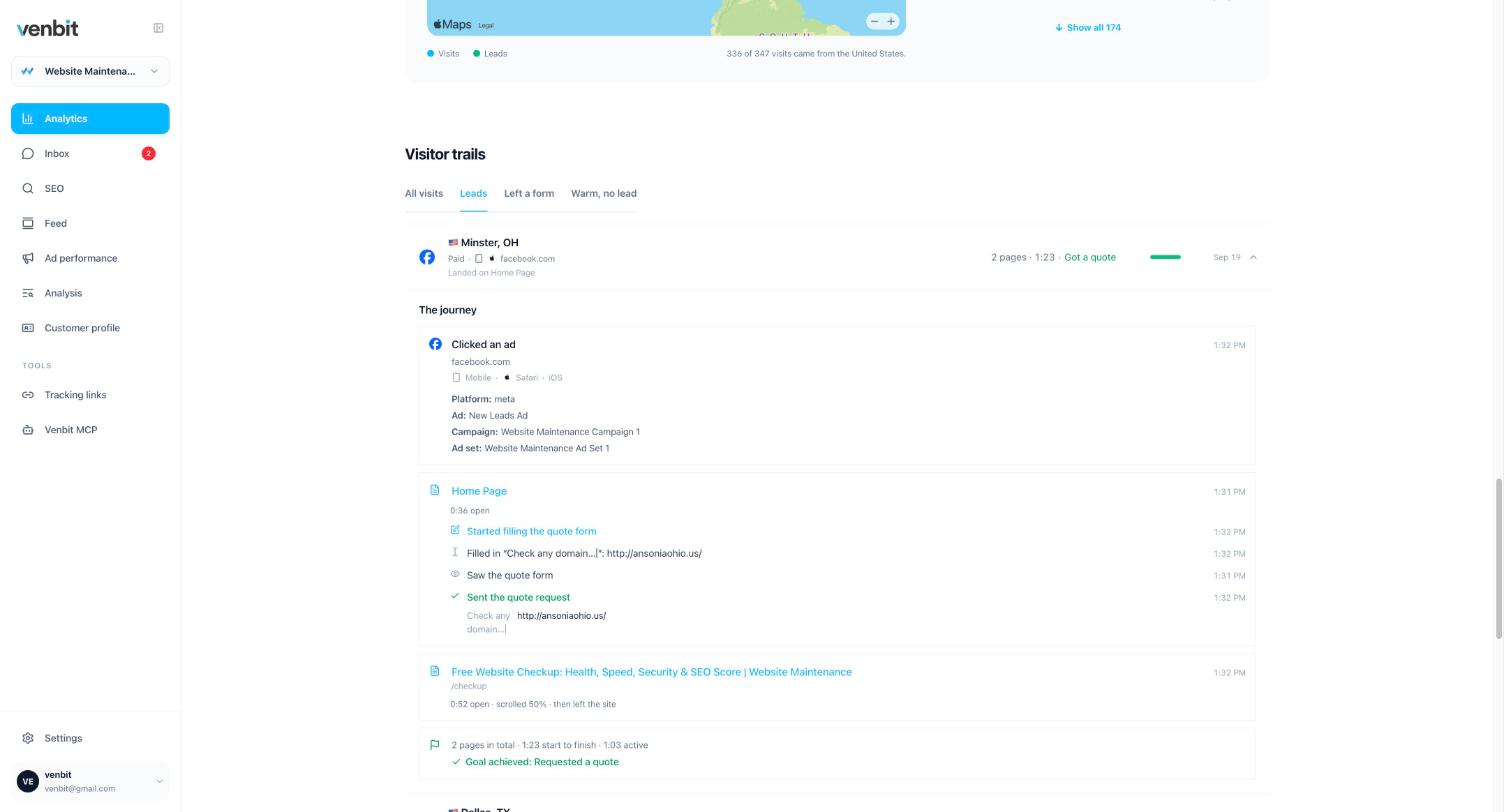
The trail is where the id becomes a sentence. The first step on the demo site reads Clicked an ad, from facebook.com, on Safari on an iPhone, with Platform meta, Ad New Leads Ad, Campaign Website Maintenance Campaign 1, and the ad set under it. The ad and campaign names are there because this ad's URL parameters passed them. On a Google Ads click that passes nothing, the step still reads Clicked an ad with the platform, and the names stay blank. A Meta click carrying only an fbclid is filed under Meta as social, because fbclid rides on ordinary Facebook posts too; the paid tag on the link is what makes it an ad.
Then the visit. Home page open for 36 seconds, started filling the quote form, saw the form, sent the quote request, then the Free Website Checkup page for 52 seconds, scrolled halfway, and left. Two pages, 1 minute 23 seconds start to finish, 1 minute 3 seconds of it active, goal achieved: requested a quote. Started filling means a field was focused. The trail names fields by their labels, and shows what was typed only to people who may see the leads.
The same lead in the inbox
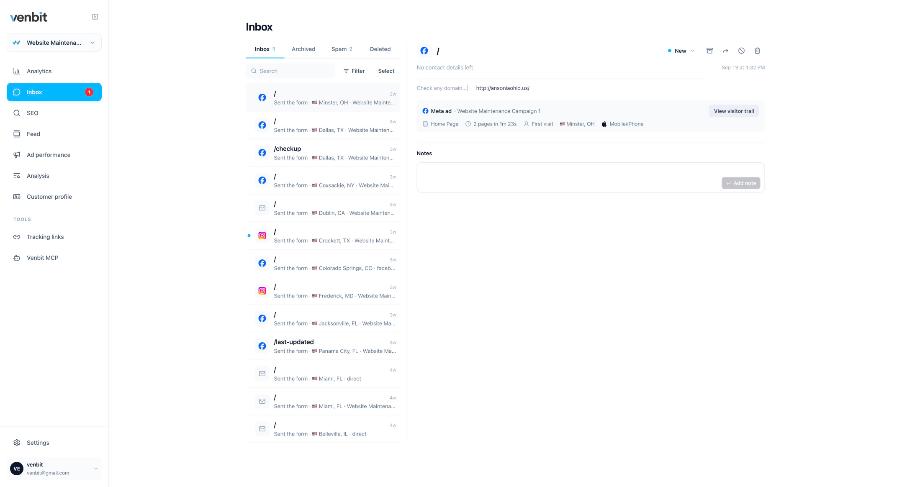
In the inbox the same lead carries one line for its source: Meta ad, Website Maintenance Campaign 1. Beside it the page the form was sent from, 2 pages in 1 minute 23 seconds, First visit, Minster, Ohio, and Mobile iPhone, with a button to the trail. The town is from IP geolocation and approximate. That one line is the answer to which ad a lead came from, and it sits on every paid lead in the list.
The inbox also holds the leads that did not come from ads, with their own sources, so where every lead came from is read off one list, paid and unpaid together, instead of from a platform report and an analytics report that never agree.
Platforms side by side
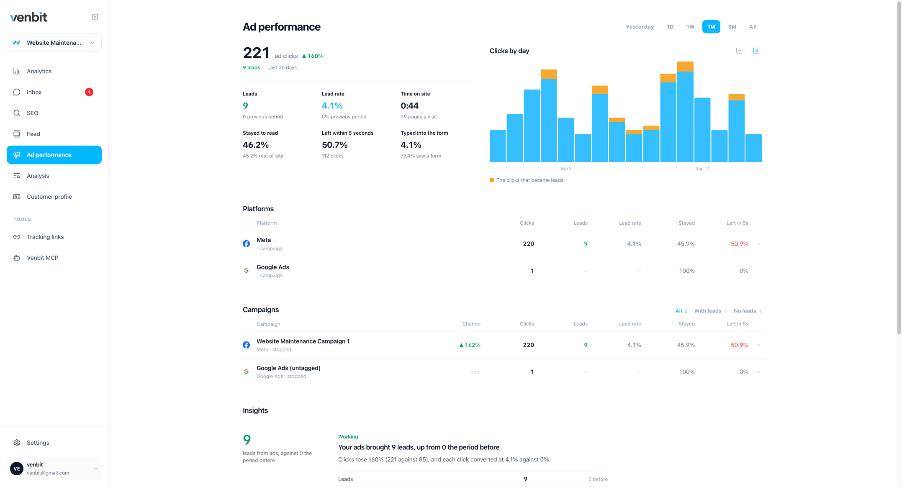
Add the paid clicks up by platform and you get the Ad performance tab. On the demo site the last 30 days read 221 ad clicks, up 140% on the period before, 9 leads, and a lead rate of 4.1%. The Platforms table splits that: Meta 220 clicks and 9 leads at 4.1%, Google Ads 1 click. Under it the campaigns, and under those a line in plain words: your ads brought 9 leads, up from 0 the period before. The iPhone app shows the same screen with that verdict at the top.
The numbers between the clicks and the leads describe what the clicks did once they arrived: 44 seconds on site, 46.2% stayed to read, 50.7% left within 5 seconds, 4.1% typed into the form. Half of the paid clicks leaving inside five seconds is the kind of fact an ads manager never shows you, because the platform's view ends at the click.
Two limits. The clicks here are clicks that reached the site, which is fewer than the clicks the platform billed, and there are no impressions, click-through rates or quality scores, because those belong to the platform and I leave them blank instead of guessing. And the tracker does not see what you spent, so there is no cost per lead and no return on ad spend on this screen. Why the platform's conversion count and your own disagree is its own article, and the short version is that they count different things.
Paid beside organic
Because the id travels with the lead, the Google Ads leads, the Meta leads and the organic leads are separate counts of the same thing, measured the same way on the same site. That is the comparison a budget decision needs. On the demo site the sources chart reads 221 ad visits against 5 from search, so the ads are carrying the site this month and the SEO or Google Ads question answers itself for now.
On a site where organic brings most of the leads, the same screens make the opposite case, and whether the Google Ads are working is read in leads and lead rate on your own site instead of in the platform's report of itself.
Tagging that is still yours to do
Click ids cover the ad platforms. Everything else that sends you traffic needs a tag, or it reads as a referral or as direct. A link in an Instagram bio, a QR code on a flyer, a line in a mailer: none of those carry a click id, and most cannot carry utm parameters either. For those, a tracking link is a short address that charts every click and files the visits it brings under the name you gave it, so the flyer gets a row in the campaigns table like an ad does.
Two tags to know about even if you never make one. ChatGPT appends utm_source=chatgpt.com to links it hands out, so a tool that lists every utm_source as a campaign shows an ad nobody bought; the tracker files those visits under AI assistants. And a Google Business Profile link tagged utm_medium=gmb is a listing, not an ad, so it belongs with search.
Related services
More on reading your website's numbers
Every question in this series, from Website Analytics for Small Business Owners.
Leads inbox4
Ad performance4
- How to Know Which Ad a Lead Came From: gclid, fbclid, msclkid (you are here)
- Google Ads Conversions Don't Match Analytics: Which Count to Trust
- Google Ads vs Facebook Ads for Small Business Leads: Your Own Numbers
- Track QR Code Scans to Leads: Tracking Links for Flyers and Posts
SEO tracking3
Visitor behaviour4
Feed and notifications3
Goals and measurement4

Tony Carnevale
Founder, Venbit
Tony started Venbit in Mill Creek, WA in 2011 and still does the work: web design, SEO, and the website analytics product the company builds and runs for its own clients. The numbers and screens in his articles come from that product, not from a content mill.