 Tony Carnevale
The short answer
One login holds every client site. Each site gets one script tag, its own inbox of leads, its own tracked rankings and its own member list, so a client invited to their site sees that site and nothing else. No cookie banner to add, no per-client property to configure. It is how we run Venbit's own client sites.
Key takeaways
- One script tag per site, pasted into WordPress, Wix, Squarespace, Webflow, Shopify or a custom build. The site switcher holds all of them.
- A client is invited to their own site by email and removed in one tap. The leads and ads box decides whether they see customer names and spend.
- Leads are stored outside the email path with the page and source, so when a client says the form is broken, you look instead of guessing.
- Rankings are measured from a chosen city, and a position is one reading from one place on one date.
- There is no ad spend in the data, so there is no cost per lead or return on ad spend to put in a report. Impressions and CTR stay in the ad platform.
- The tracker sets no cookies and stores no cross-site identifiers, so it adds no banner of its own to any client site.
One login, every client site in a switcher, one script tag on each. That is the whole setup. Each site keeps its own inbox of leads, its own tracked Google rankings, its own ad performance and its own list of who may see it, and a client you invite to their site sees that site and nothing else in your account.
I run a web design company, and Venbit analytics started as the thing we put on our own clients' sites so that when a client asked whether the site was working, the answer was on a screen instead of in a monthly PDF nobody read. This article is the agency side of it: what gets installed, what the client sees, what the report is, and what it leaves undone.
One tag per site, one login for all of them
Settings for each site shows the tracker as one script line and the domains it is allowed to run on. Paste it into the site's head, or hand it to whoever maintains the site, and it works on WordPress, Wix, Squarespace, Webflow, Shopify and anything custom, anywhere a script tag can go. It loads after the page and weighs less than a photo. There is no per-client property, no container, no tag manager account to hand around.
Under the tracker line is the question that makes the numbers mean something for each client: what counts as a win on this site. Pick the kind of business and the screen offers the handful of goals that kind of site has, a form and a phone tap for home services, a form and an email click for professional services, a purchase for an online shop. A win on one client's site is a form; on the next it is a call. The dashboard and every report use whatever that client's answer was.
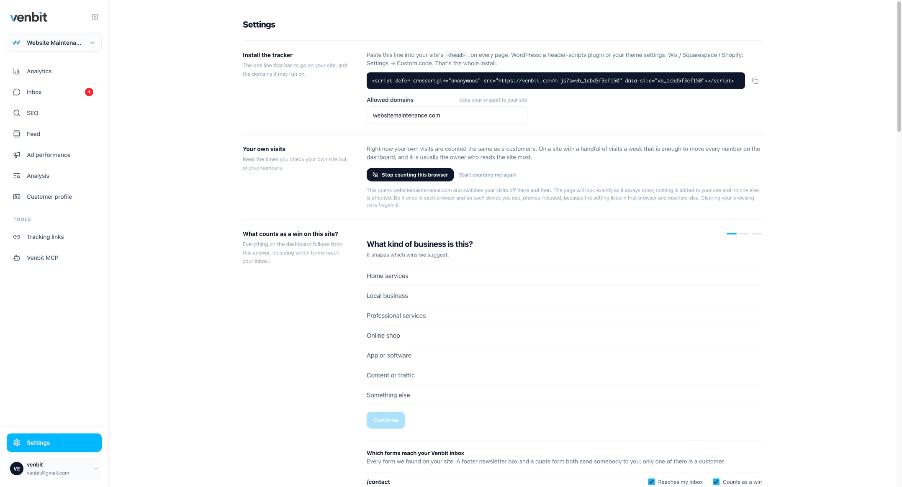
Turn on stop counting this browser in your own office and on every machine that works on a client site. An agency opens its clients' sites more than anyone, and on a quiet site that is a visible slice of the month.
Sharing analytics with a client, one site each
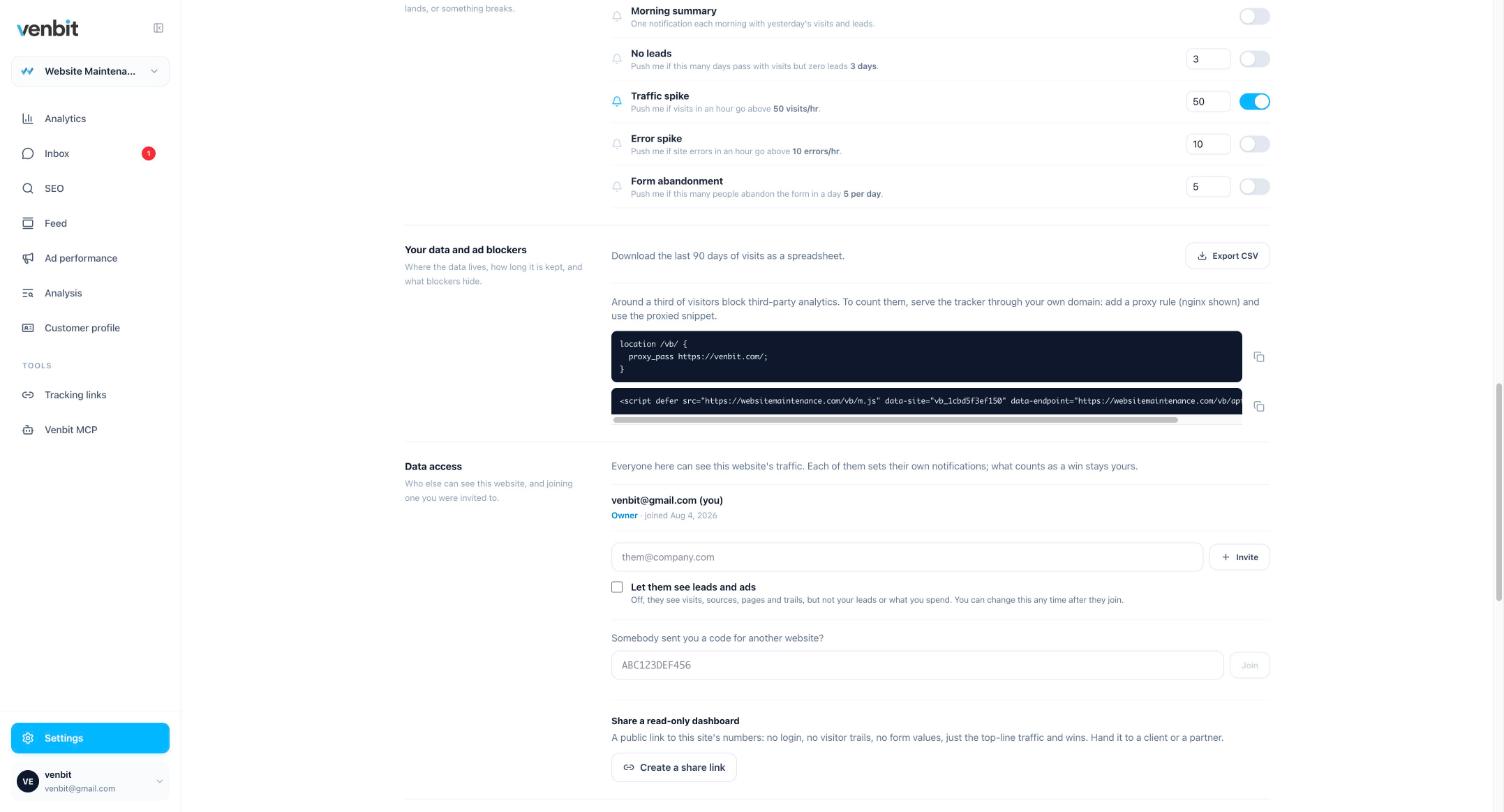
Each site has a Data access section with the line Everyone here can see this website's traffic and, under it, the people who can. You are there as the owner. Type the client's email, decide whether to tick Let them see leads and ads, and press Invite. They get a code, and when they accept it, their site appears in their own switcher, next to any other Venbit site they already have. They never see your other clients.
The leads and ads checkbox is the one decision. Ticked, the client sees the inbox with what people typed and the Ad performance tab with what the campaigns did. Unticked, they see traffic, pages, rankings and visitor trails, and in their trails the typed values and tapped phone numbers are blanked. For a client whose own customers these are, tick it. For a stakeholder who wants the charts and not the names, leave it.
When a client leaves, remove them from the list in one tap, and nothing else changes. When you leave, the client keeps the site if they own it, which is the arrangement I would want on the other side of the table. How the owner should think about sharing access is written for them, and it is worth sending before they ask.
The client report that sends itself
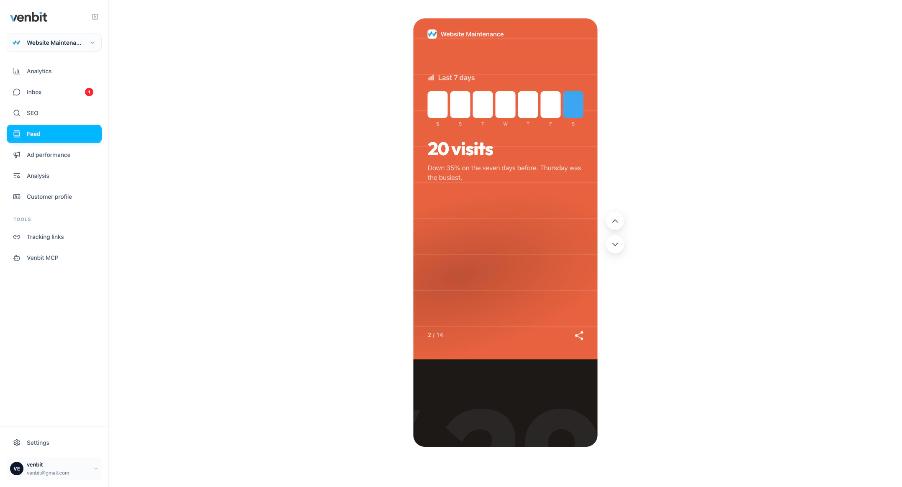
The monthly PDF exists because the client cannot read the dashboard, and the fix is a report they can read on a phone. Settings has Send me a report, daily, weekly or monthly, with a push when a win happens and an email if you want one too. The feed shows the same period as cards you swipe through: last 7 days, 20 visits, down 35 percent on the seven days before, Thursday was the busiest, with a share button on the card. Those are the demo site's figures.
For the client who wants the why, the Analysis tab is a plain-English readout of the site's data, grouped by the questions owners ask: what changed and why, where are people finding me, did my ads pay off, why aren't more visits becoming leads. The model that writes it never computes a number; every figure it may use is worked out first and handed to it, and any number it invents anyway is caught before the readout ships. A site with too little data is told so, not given a story.
That is the honesty an agency needs in a readout a client will read, because a confident paragraph built on forty visits is the fastest way to lose a client's trust in every number after it.
Showing a client their leads and their rankings
The first thing a client asks is whether anybody called, and a visit count cannot answer it. Every form submission and phone tap lands in that site's inbox with the page it came from, the source and the trail of the visit under it, stored outside the email path; an email click counts as a lead on the visit and sends a push, without a row of its own. When a client says a customer filled out the form and nothing arrived, you open the inbox and look. Either the submission is there and their email is the problem, or it is not and the form is.
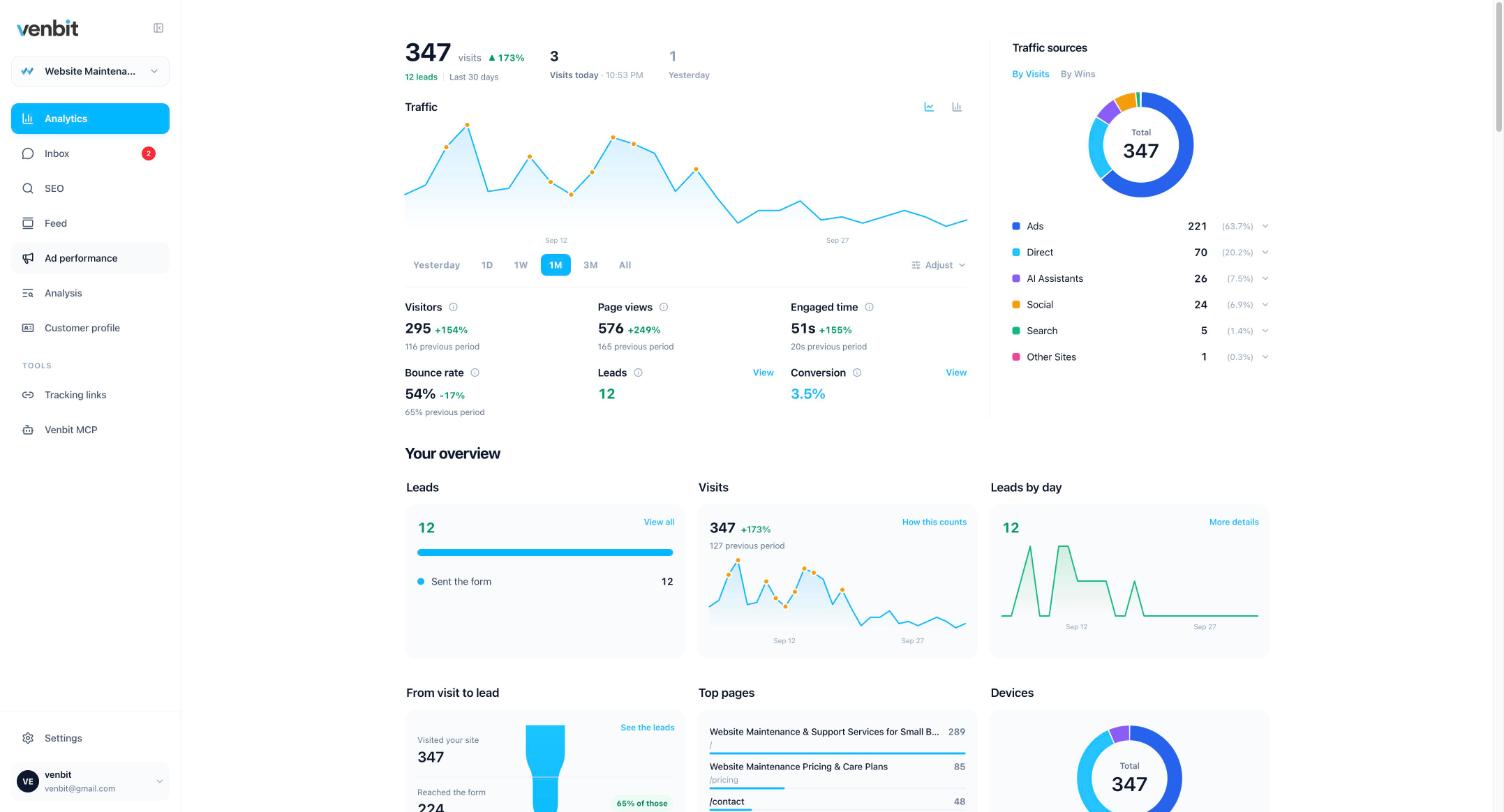
Ad leads are labelled by platform without any tagging on your part. The click id an ad platform stamps on the landing URL, gclid for Google, fbclid for Meta, msclkid for Microsoft, is kept with the visit, so Google Ads leads, Meta leads and organic leads are separate counts even on a site nobody tagged. On the demo site the Ad performance tab reads 221 ad clicks and 9 leads, a lead rate of 4.1 percent, with the Meta campaign at 7 leads from 137 visits.
What the ads data does not hold is spend, impressions, click-through rate or quality score. Those belong to the ad platform, and the screen leaves them out instead of guessing. So there is no cost per lead and no return on ad spend here, and a client report that needs them takes the spend from the ads account and the leads from this inbox. A client's goal value is a figure they typed, too, not revenue the tracker measured.
Rankings live in the same login. Track the searches a client cares about, measured from the city you choose, and each check keeps the whole results page, so a keyword opens to the companies ranking above the client with their ratings. A position is one reading from one place on one date, and the alert when a keyword reaches page one, reaches the top three or slips off page one goes to the client's phone as well as yours, so the win is theirs before the invoice is.
The free and simple tools stop at visits, and that is a fair place for them to stop. None of them stores a client's leads or shows a ranking beside the visits, which is the part a client wants from an agency report, and the simple analytics tools compared says what each one does and leaves undone, ours included.
No banner on any of them
The tracker sets no cookies and stores no cross-site identifiers, so it adds no cookie banner of its own to any client site. Across twenty sites that is twenty banners you did not install, style, translate and argue about. Whether a client's site needs a banner for other reasons depends on what else runs on it and who visits, and the cookie banner question is answered properly in its own article. It is not legal advice.
Visitors are counted by a random ID in their browser with no cookie and no fingerprint, and no raw IP address is stored. Bots are dropped before anything is counted, so the visit figure in a client's report is people. Expect it to run lower than whatever estimator the client has been looking at.
Asking across clients
Each site has an MCP page where you make a key that reads that one site, named for the client. Give the key to Claude and ask it the question the client is about to ask you: where visitors fall off, which pages the leads read first, whether the campaign is bringing anyone who writes. Revoke the key from the same page when the engagement ends. How the MCP server works and what to ask it has the real chat and the real funnel.
The same sites are in the iPhone app, with a push the moment a lead arrives on any of them and the site's name in the notification. For an agency on call for its clients, that push is the difference between hearing about a lead on Monday and answering it on Saturday.
No white label, and the rest it leaves undone
The portal carries Venbit's name, not yours. It does not record screen video of visitors; a trail is the steps a person took, read in a minute, with form field labels; the typed values show only to someone with the leads box ticked. It does not name anonymous visitors, estimate a competitor's traffic or replace the ad platform's own reporting on impressions and spend. Those are different tools.
Clients choosing between a freelancer and an agency for their website's upkeep ask about reporting, and the honest answer from either is that the numbers should live in an account the client can open after you are gone.
Related services
More on reading your website's numbers
Every question in this series, from Website Analytics for Small Business Owners.
Leads inbox4
Ad performance4
SEO tracking3
Visitor behaviour4
Feed and notifications3
Goals and measurement4
Privacy, AI and teams3
- MCP Server for Website Analytics: Ask Claude About Your Own Site
- How to Share Website Analytics With Your Designer or Marketer
- Analytics for Multiple Client Websites: One Login for an Agency (you are here)

Tony Carnevale
Founder, Venbit
Tony started Venbit in Mill Creek, WA in 2011 and still does the work: web design, SEO, and the website analytics product the company builds and runs for its own clients. The numbers and screens in his articles come from that product, not from a content mill.