 Tony Carnevale
The short answer
People abandon a contact form at a field that asks too much, after an error the form showed them, or because the page broke. Find which by filtering visitor trails to Left a form and reading where each person stopped, then checking form errors, JavaScript errors and broken links ranked by how many people hit them.
Key takeaways
- 'Started a form' means a field was focused, not that anything was typed, so a visitor who tapped a field and kept reading is not an abandonment.
- On the demo site 224 of 347 visits reached the form and 13 sent it, so reaching the form is not the problem there; the step after it is.
- Typed into the form is the stricter count, 4.1% of ad clicks on the demo site, and a wide gap between it and form starts means people touch the form and do not commit.
- Form errors, broken links and JavaScript errors are ranked by how many different people hit them, so one tester cannot top the list.
- A submit is only an attempt until the form provider confirms it, which is how a form that eats submissions silently shows up.
- The Form abandonment alert in Settings watches for it, so you do not have to read the filter every week.
People abandon a contact form for three reasons you can see and one you cannot. A field asked for more than they wanted to give, the form showed them an error and they gave up, or the page itself broke under them, with a script error or a dead submit button. The one you cannot see is that they changed their mind, and the only honest way to tell that case from the others is to read what they did at the form, person by person.
That reading is what follows. Everything shown on the screens is the demo site, WebsiteMaintenance.com, over its last 30 days.
First, whether they reached the form at all
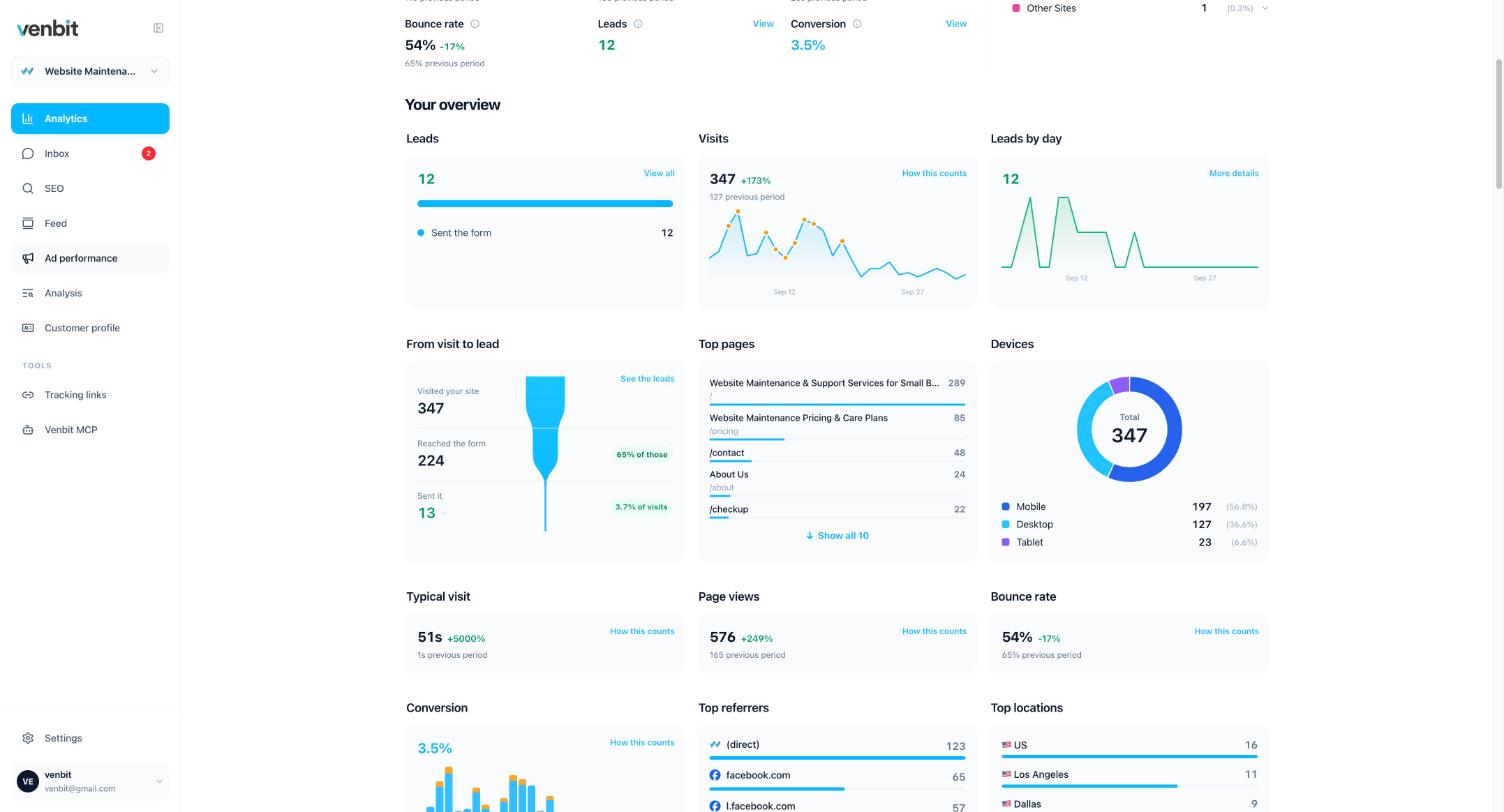
The funnel on the overview has three steps: visited, reached the form, sent it. On the demo site that is 347, 224 and 13. Two thirds of visitors reached the form, so the demo site has no trouble getting people to it; the loss is the step after. Your own funnel decides which article you need. A site where 40 of 400 visits reach the form has a path problem and not a form problem, and the diagnosis for that is traffic without leads.
What 'started the form' means
In Venbit a form is started when a field is focused. A tap into the name box, a click into the message box, a keyboard tab that lands on a field: each starts the form, and none of them means a letter was typed. I set it that way on purpose, because the moment a visitor touches the form is the moment they considered contacting you, and the gap between that moment and a sent form is the number this article is about. Read it with that definition in mind, since a share of the people in Left a form were browsing with their thumb.
The Ad performance screen keeps the stricter number separately. Typed into the form is 4.1% of ad clicks on the demo site, and that one counts only visits where somebody typed into a field of a form that asks how to reach them, or sent it. When the two numbers are far apart, people are touching your form and not committing to it.
Read the people who left
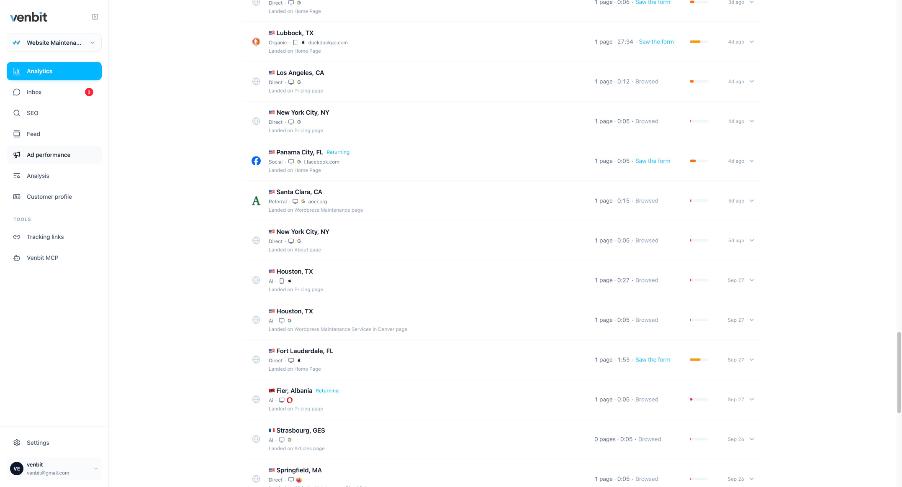
Open Visitor trails in Venbit's website analytics and set the filter to Left a form. Each row is a visit that started your form and did not send it. Open one, find the line 'Started filling the form', and read what follows. The trail names each field as it was filled, by its label, so a visit reads: started filling, filled in Name, filled in Email, filled in Phone, left. Whatever field comes after the last one filled is the field that stopped them.
Read ten in a row before you conclude anything. One person leaving at the phone field is a person who did not want a call. Seven of ten leaving at the phone field is a form that asks for a phone number before it has earned one, and making that field optional is a ten-minute change you can grade the next week in the same filter.
The typed values themselves do not show here unless Capture typed form values is on in Settings, and even then only people you have allowed to see leads can read them. What an abandoner typed before giving up is their name, email and phone, which is as private as a sent form, so everyone else sees the field labels alone.
Contact form errors the visitor saw and you did not
The second cause is an error the form showed. A validation message, a captcha that failed, a provider that rejected the submission, a submit button whose script threw an error. From your desk these are invisible, because your own browser is logged in, up to date and on good wifi. Venbit records form errors, JavaScript errors by page and broken links as the site's problems, and ranks each by how many different people hit it, with the number of times behind it. One tester clicking a broken button twelve times is one person; forty visitors hitting the same error once each is forty, and only the second is costing you leads.
A submit is also treated as an attempt until the form provider or your application confirms it was accepted. The form that eats submissions silently, the kind that shows a spinner and nothing else, leaves attempts with no confirmation behind them, and that pattern is the first thing to look for when the funnel's last step is thinner than the trails suggest. For that case, the contact form that is not sending emails is the repair guide.
A rage click on the submit button is the loudest version of this. Four or more clicks in the same spot with no response from the page for two and a half seconds is recorded as one, and what a rage click is and when to worry covers the thresholds. On a contact form, a rage click on Send is a visitor trying to become a lead and failing.
When the page broke before the form
The third cause is upstream of the form. Someone clicks a menu link to a contact page that was renamed last year and lands on a 404. Or the page loads, but the image above the form never does on a phone and the page looks abandoned. A script error on the page can stop the form rendering at all. Each of these appears in the same problems list, by page, and images that fail to load has its own checks to run in order.
Let the alert find it
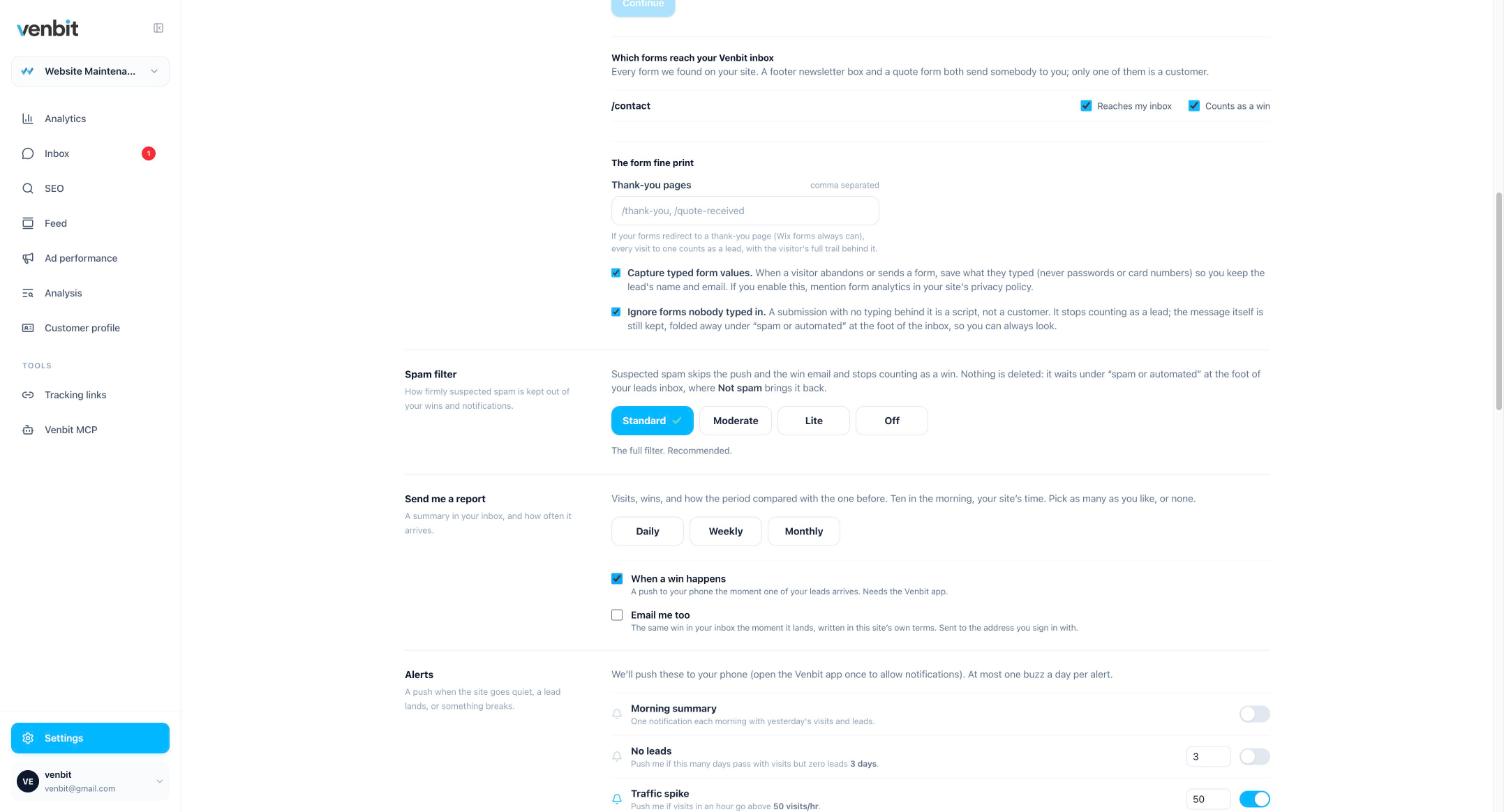
You will not read the Left a form filter every week, and you should not have to. Two alerts in Settings do the watching: Form abandonment, for people starting the form and not sending it, and Error spike, for the site's errors jumping. They sit in the same Settings screen as the push you get for a new lead, which lands in the Venbit app for iPhone with the sender's name in it and the message one tap away.
The settings above them decide what gets counted. Which forms reach the inbox decides what counts as a sent form; on the demo site that is the /contact form, set to reach the inbox and count as a win. Ignore forms nobody typed in keeps a bot that submits an empty form out of your lead count, and the spam filter judges what did arrive.
The fixes, in the order I make them
- 1Make the phone field optional, or remove it, if the trails stop there. Ask for the number in your reply instead.
- 2Cut the form to the fields you need in order to reply: a name, one way to reach them, and the message.
- 3Give the submit button a visible state while it sends and a confirmation page afterwards, so nobody clicks it four times.
- 4Fix the ranked errors from the top, by people affected, and re-check the row a week later.
- 5Open the form on a phone, on cell data, and send a test, then check that it arrived in the inbox and in your email.
After a change, the same two views grade it: Left a form should shrink and the funnel's last step should grow, measured against the previous period on the dashboard. If the trails still stop at the same field after a week, the change did not reach the people who were leaving, and the device column in those rows says what they were holding.
Related services
More on reading your website's numbers
Every question in this series, from Website Analytics for Small Business Owners.
Leads inbox4
Ad performance4
SEO tracking3
Visitor behaviour4
- What Is a Rage Click? The Definition and Why It Costs You Leads
- How to See What Visitors Do on Your Website, Step by Step
- Which Pages on My Website Get Read? Your Most Visited Pages, Counted
- Why Do People Abandon My Contact Form? How to Find the Field (you are here)
Feed and notifications3
Goals and measurement4

Tony Carnevale
Founder, Venbit
Tony started Venbit in Mill Creek, WA in 2011 and still does the work: web design, SEO, and the website analytics product the company builds and runs for its own clients. The numbers and screens in his articles come from that product, not from a content mill.