 Tony Carnevale
The short answer
An MCP server lets an AI assistant read a system directly. Venbit's gives Claude one key per website. Claude then reads that site's visits, leads, rankings and friction and answers in plain words. Asked where venbit.com's visitors fall off, it read a funnel of 392 visits, 74 reaching the contact page, 10 submitting and 6 conversions.
Key takeaways
- Keep the keys for assistants. A person who needs the data is invited to the site instead, where their access carries a name and comes back in a tap.
- A Venbit key reads one website only. Name it, create it, paste it into Claude, and revoke it from the same screen when you are done.
- Every number Claude reads is the tracker's own count, with bots already dropped. Claude explains and compares; it does not measure.
- Started a form means a field was focused, not that anything was typed. Ask Claude to show the counts behind an answer before you act on it.
- Export for AI builds a file for assistants that cannot connect, with the problems list and the question you want answered.
An MCP server is a small program that lets an AI assistant read a system directly. Model Context Protocol is the open standard Anthropic published in late 2024 for it. Instead of exporting a report, pasting it into a chat and hoping the assistant reads the right column, you give the assistant a connection, it asks the server a question, and the server answers from the live data. Venbit's MCP server does that for a website's analytics: one key, one site, and Claude can read it.
I built it because I was already asking Claude about venbit.com's numbers by pasting exports into it, and the pasting was the slow part. With the key, I type the question in the words I would use with a person. Where do visitors fall off before the contact form. Which pages produced leads this month. Is the Meta campaign bringing anyone who writes. Claude reads Venbit analytics for the answer, and the answer carries the counts it was made from.
What the connection reads
The same counts the portal shows. Visits, visitors, page views and conversions for any window you name, as a total, as a trend by day, week or month, or broken down by channel, campaign, landing page, device or town. Every paid campaign with the visits and enquiries it produced, identified from the click id, set against what the rest of the site brought for free.
Tracked Google rankings, each keyword's latest position, what moved and the visibility score. The friction list, rage clicks, dead clicks, form errors, JavaScript errors and not-founds, ranked by how many different people hit each one. Individual visitor journeys, step by step, with field labels and never what anyone typed. What is on the site itself: the forms, the phone numbers, the pages. And load speed as real visitors measured it, the 75th percentile Largest Contentful Paint. It does not read the inbox, so no message or name passes through it.
The numbers are the same ones the dashboard and the iPhone app show, because they are read from the same place. Bots are dropped before anything is counted, so the visit figure Claude quotes is people. A ranking position it quotes is one reading from one place on one date. The definitions behind each number are the ones on the portal's definitions page, and nothing Claude is given is computed differently for it.
Making a key
The Venbit MCP page is in the portal for each site. The heading says what it does: give Claude a key and it can read your analytics directly. Under that is a note worth reading twice, that a key made here reads only this website. If you have three sites, you make three keys, and a key for one cannot see the others.
Give the key a name and press Create key. The name is for you, so you remember which assistant or which person holds it. On the demo site, WebsiteMaintenance.com, the Your keys list shows two, Droll Bot and Claude, each with a Revoke button beside it. Revoke is the whole of the off switch. Press it and that key reads nothing from the next request on.
Below the keys is a link for people using a config file instead, which is how some tools take their MCP connections: a short block of settings you paste into the tool's own configuration. The page gives you that block for the key you made. The bottom of the page lists example questions to start with.
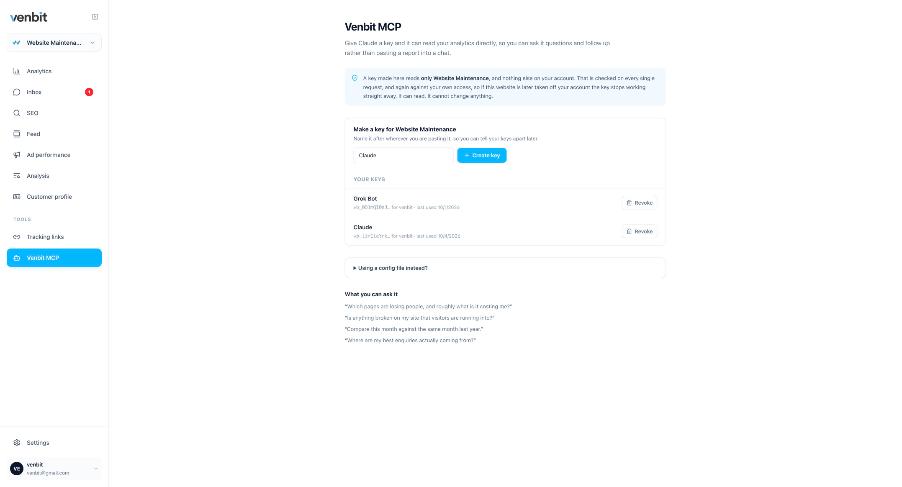
What questions AI can answer from your site data
The useful questions are the ones you would ask a person who had the dashboard open and you did not. What is my bounce rate is one number you can read yourself. Why did leads drop in September when visits went up needs four screens compared, and that is the kind that pays. Here is the one I asked about venbit.com.
I asked it to look into the visitors, look for trends, and say where they are falling off. It pulled twelve weeks, June 1 to August 27, and drew the funnel: 392 visits, 6 conversions, 1.5 percent; 74 of the 392 reached the contact page, 13 started the form and 10 submitted it. The shape says where the drop is, between arriving and reaching the contact page, and that part is my reading of its chart. It is venbit.com's own data, not the demo site's, and the screenshot below is the real chat.
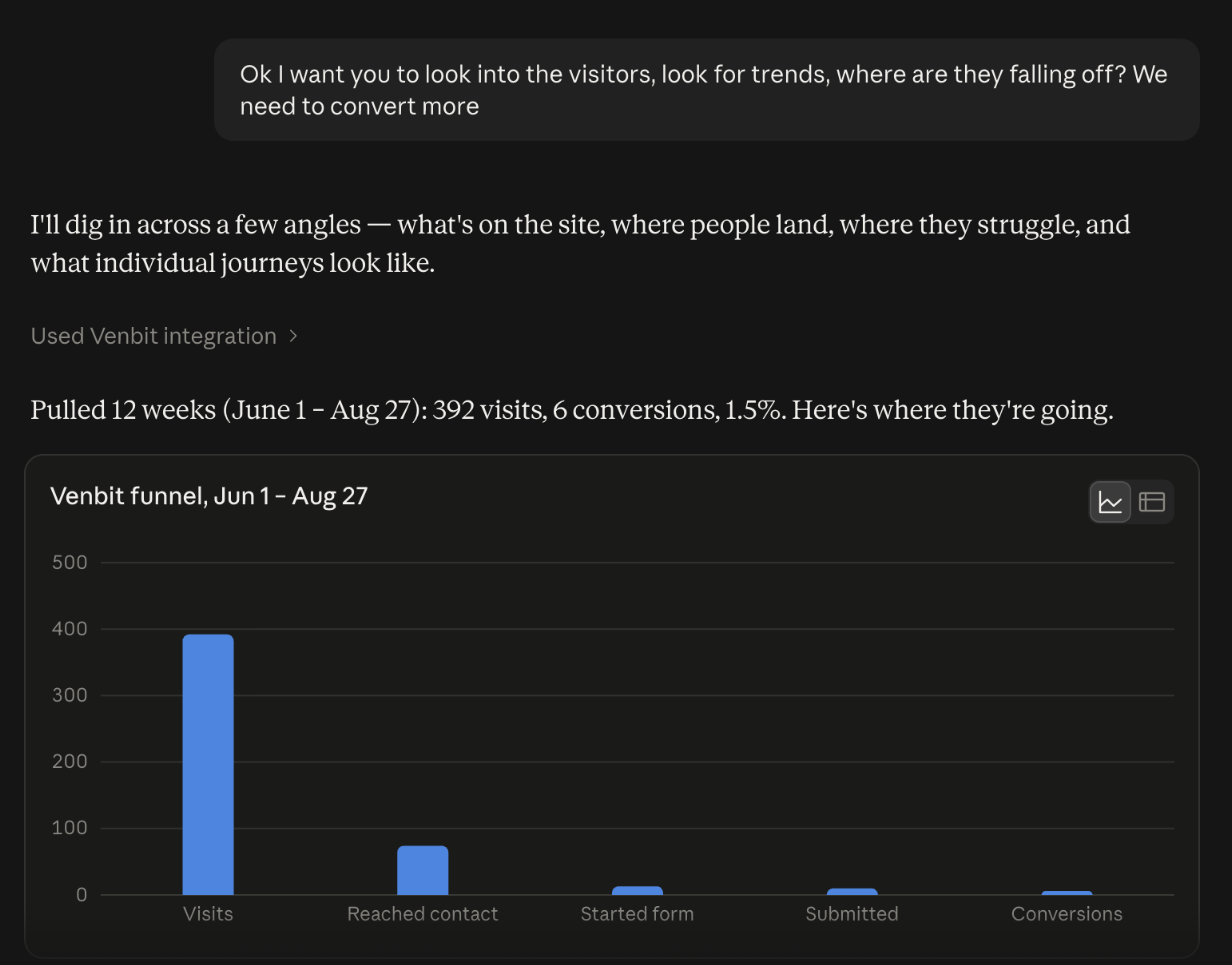
Read that funnel with one definition in hand. Started the form means a field was focused, not that anything was typed. Somebody who tapped into the name box and left counts as a start. So 13 started and 10 submitted is a smaller drop than it looks, and I would not spend a week on the form over it. The place to spend the week is the 318 visits that never reached the contact page.
Other questions that pay. Which pages did this month's leads read before they wrote, and which pages did nobody who wrote ever read. The campaign that brought the most leads for its clicks. What position I hold for a tracked search and which keywords moved this month. The page with the most rage clicks and the element people were hitting. How slow the site is for real visitors at the 75th percentile. Each of those is a screen in the portal, and Claude's value is in holding several at once.
What the answers are made of, and what to check
Every figure the server hands over is the tracker's. The tools tell Claude not to estimate what is not there, spend and search volume among them, and if the data is thin, thin data is what it gets. What Claude adds is the reading, the comparison and the plain words, and that layer can be wrong the way any reading can be wrong. It can call a difference meaningful when it is 3 against 2.
So ask for the counts. A question that ends with show me the numbers you used gets an answer you can check against the dashboard in a minute, and I do that for anything I am about to spend money on. Treat the numbers as measurement and the paragraph around them as a colleague's opinion, which is exactly what it is.
There is a second way AI touches your site that this connection has nothing to do with. Whether ChatGPT, Claude and Gemini recommend your business when a buyer asks them is a different question, answered by asking the assistants repeatedly and recording what they say, and that is its own feature and its own article.
Export for AI, for assistants that cannot connect
Some assistants cannot take an MCP connection, and some people you want to hand the data to should not hold a key. For both, Settings has Export for AI. Pick how far back, 7, 30 or 90 days. Tick what should go in: traffic and pages, leads and goals, advertising, visitor journeys, and problems, which is the rage clicks, dead clicks, form errors and JavaScript errors by page. Then pick what you want figured out, from why am I not getting more leads to a general health check, and press Build the export.
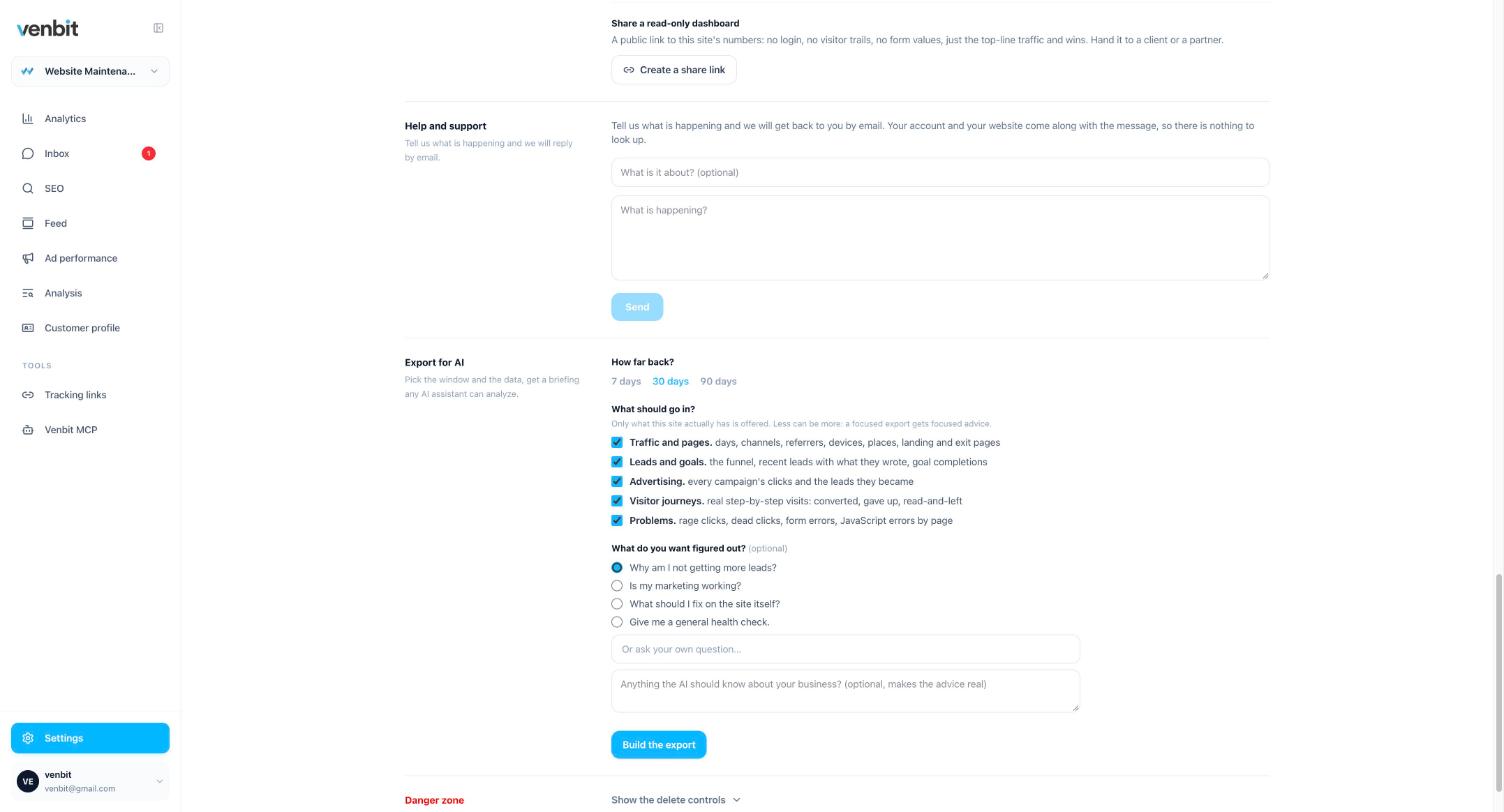
The export is the right tool for a one-off. A consultant you are paying for an afternoon, an assistant your company has standardized on that does not speak MCP, a question you want to ask once. The key is the right tool for a standing question you ask every Monday.
What a Google Analytics connection reads instead
Google Analytics measures visits and events, and a connection to it gives an assistant those. Google's own terms forbid sending it personal information, so it holds no inbox of leads with the message and the source in each one, and it does not track the position you hold in a chosen city for a search you care about. Those are the two things a small business owner asks about first, and what Google Analytics will and will not tell a small business is a longer answer on that.
If you are choosing a tool at all, the comparison that matters is what each one stores, because an assistant can only read what is there. The simple analytics tools compared sets them side by side, ours included, with what each leaves undone.
An analytics MCP for agencies
One key per client site, named for the client, is the pattern, and a client's key is revoked the day the engagement ends from that client's own MCP page. The rest of what an agency needs from one login across many sites is a separate article.
Do not hand a key to a client as their way in. A key is a machine's access, with no name on the person using it. Invite them to their own site instead, where the access is theirs and can be taken back in a tap, and keep the keys for the assistants.
Related services
More on reading your website's numbers
Every question in this series, from Website Analytics for Small Business Owners.
Leads inbox4
Ad performance4
SEO tracking3
Visitor behaviour4
Feed and notifications3
Goals and measurement4
Privacy, AI and teams3
- MCP Server for Website Analytics: Ask Claude About Your Own Site (you are here)
- How to Share Website Analytics With Your Designer or Marketer
- Analytics for Multiple Client Websites: One Login for an Agency

Tony Carnevale
Founder, Venbit
Tony started Venbit in Mill Creek, WA in 2011 and still does the work: web design, SEO, and the website analytics product the company builds and runs for its own clients. The numbers and screens in his articles come from that product, not from a content mill.