 Tony Carnevale
The short answer
To check your Google ranking from another city, run the search as if you were standing there. The Ad Preview tool in Google Ads does that once; a tracked keyword with a city attached does it on a schedule, in the organic results and the map pack. One reading is one place on one day. Watch the line over weeks.
Key takeaways
- Your own search is personalised by your location and your history. It is the one result page in town that does not describe what customers see.
- A tracked keyword is measured from a city you pick, and the check records the organic position and the map pack spot together.
- Every check keeps the whole results page, so a keyword opens to the companies ranking above you on that search, with their ratings.
- Core keywords are checked daily, ten results deep, and every keyword weekly, fifty deep. Past fifty a position is worth nothing in clicks.
- Visibility, a 0 to 100 score across all tracked keywords, moves only when rankings improve. Average position gets worse the day you add a hard keyword.
You searched for your own service on your own phone and you are third. A customer two towns over searched the same words and you were nowhere. Both searches were real. Google ranks by where the searcher is, and for a local business the gap between the result page at your desk and the result page in the town you want work from is the whole question.
To check a ranking from another city you need a search that is run from that city, or that tells Google to behave as if it were, and you need it in the organic results and the map pack separately, because the two move for different reasons. Then you need to do it again next week, since a single reading cannot tell you which way you are heading.
Why your phone shows a different ranking
Google's own documentation says the results depend on the searcher's location, their language and their past search history. Your phone has all three working against the reading. It knows where you are standing, it has watched you visit your own site a hundred times, and it is signed in to an account that has clicked your listing before. The result is a page that flatters you.
A private window removes the history and keeps the location, which is the bigger of the two for a local search. Adding the city to the query, plumber in Everett, changes the search itself, so you are now measuring a different keyword from the one your customer typed, which was plumber near me, standing in Everett.
The map pack adds its own distance rule. The three businesses in the box are chosen partly by how close each one is to the searcher, so a map pack position is tied to a point on the map in a way an organic position is not. Your map pack rank from your own shop is the least useful number you can collect.
The manual way, and its limit
Google Ads has an Ad Preview and Diagnosis tool that shows a preview of the results page for a search term, a location and a language you choose, without adding ad impressions to your account. It lives inside a Google Ads account, under the troubleshooting tools, and it is the honest manual method, fine for a one-off look at one keyword from one city.
Its limit is that it produces one reading, by hand, which you then have to write down somewhere with the date. Ten keywords in three cities is thirty lookups, and the week you skip is the week something moves. Where your website really ranks on Google goes through the manual checks in more detail and why the number is slipperier than it looks.
Tracking a keyword from the customer's city
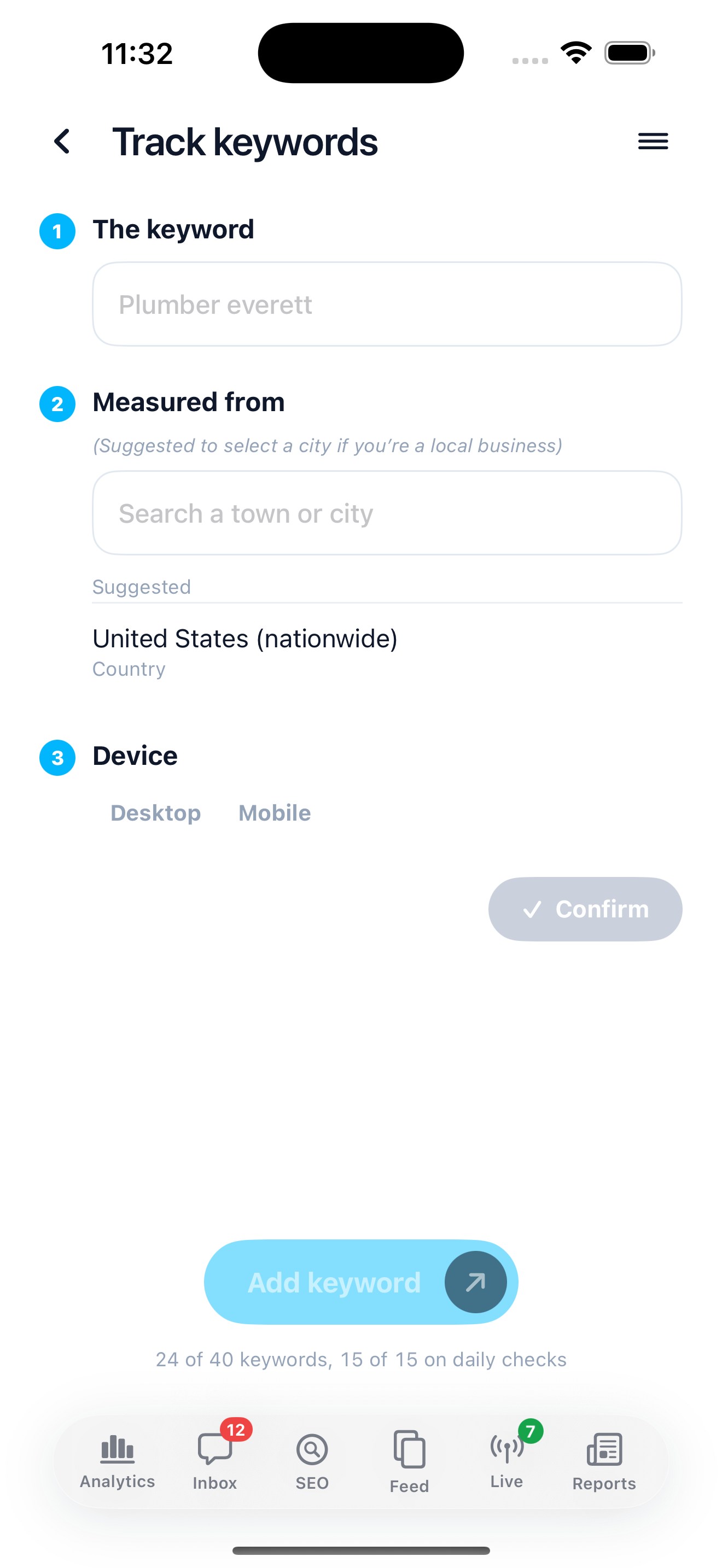
In Venbit's analytics a tracked keyword has a city attached to it, and every check runs as if the searcher were there, which is the whole trick and the one thing the manual method cannot do on a schedule. Add the keyword, pick the city your customers are in, and the readings arrive from there from then on.
If you do not know which searches to track, the SEO tab offers to find them. Tap Find them for me and it reads what people wrote in your inbox to suggest the searches worth tracking, or you add your own. Each one is then checked for its Google position and its spot in the map pack.
Two speeds of checking, and the split is deliberate. A daily pass looks at your core keywords ten results deep, because ten results is page one and page one is the only place an alert can honestly fire from. A weekly pass looks at everything fifty deep, which is where the history and the near-wins come from. Past fifty a position is worth nothing in clicks, so there is no point paying to look.
Organic position and map pack, on one row
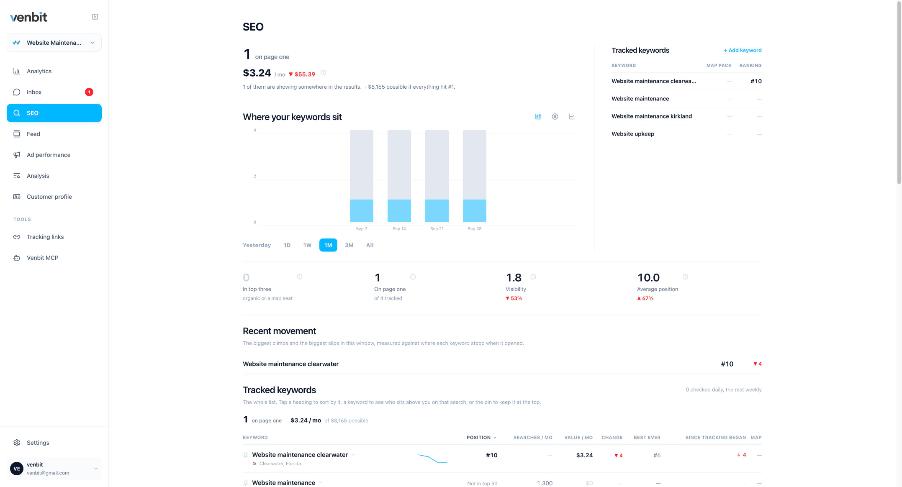
This is the SEO tab on our demo site, WebsiteMaintenance.com, and every number read from a screenshot on this page is from that site. It tracks one keyword on page one. The Recent movement line reads Website maintenance clearwater, #10, down 4, so the keyword is a service plus a city, it sits at the bottom of page one, and it is down four places. The stat row shows visibility 1.8 and an average position of 10.0.
The table under it has a column for each thing you would otherwise write in a notebook: position, map pack, searches per month, value, change, best ever, and since tracking began. Best ever is there for a reason. A keyword that reached #4 once and sits at #10 now is a different problem from one that has never left #10, and the single current number cannot tell you which you have.
Read the row as a history. A position is one reading from one place on one date, and a drop of four places on a Tuesday can be back on Thursday with nothing done. What matters is where the line sits after a month, and whether the map pack column is filled in for the city you chose.
Who outranks you there
Every check keeps the whole results page, so a keyword opens to the companies ranking above you on that search, with their ratings. This is the part a manual check from your own phone gets most wrong, because the businesses above you in the map pack from your shop are your neighbours, and the businesses above you in the map pack from the customer's town are your competitors.
Across all your keywords, the tab also works out the five sites that beat you most and what they rank for, folding the results pages it already holds together with the rivals Google's own index associates with your domain. Directories are thrown out first, because a review site competing with a plumber is a quirk of the data and not a competitor you can do anything about.
The Venbit app for iPhone shows the same keywords, the same history and the same competitors, so the check from the customer's city is in your pocket.
For the map pack in particular, how to rank a business in the map pack covers what moves those three spots, using Bellevue as the worked example.
Visibility, and why average position misleads
Average position looks like the obvious headline and it is a trap. Add one hard keyword to the list and the average gets worse, so the chart falls on the day you did more work. It also treats #1 and #2 as one place apart, when in clicks they are far apart.
Visibility fixes both. Each keyword earns a share of the clicks its position gets, those shares are averaged over every tracked keyword including the ones not found at all, and the result is a number from 0 to 100 that only rises when the rankings improve. Not ranking scores zero, because not ranking is a real result, not a missing one. On the demo site visibility reads 1.8 where the average position reads 10.0, and the gap between the two numbers is the keywords the average leaves out. The small number is the honest one.
Dividing by the tracked count and not the found count is the whole point. Ranking for three of forty terms cannot read as a triumph.
What to do with the reading
A ranking checked from the right city tells you whether the work is working, and that is all it tells you. If the keyword is on page one in the town you chose and the leads from that town are not arriving, the problem is on the site, and the inbox and the visitor trails are where to look next. If the keyword is off page one there, how to get a business on the first page of Google is the work itself.
The readings also feed two things you do not have to check. When a keyword reaches page one, reaches the top three or slips off page one, the app sends a push with the keyword and the positions it moved between, one ranking push per site per day however many keywords moved. Ranking drop alerts and review notifications explains what arrives and when.
And rankings are no longer the only place a customer finds you. Someone in that same town is asking ChatGPT who to call, and whether the assistants recommend your business is a separate check, run a separate way, and the feed shows the last one as a card beside the week's rankings.
Related services
More on reading your website's numbers
Every question in this series, from Website Analytics for Small Business Owners.
Leads inbox4
Ad performance4
SEO tracking3
- How to Check Your Google Ranking From Another City (and the Map Pack) (you are here)
- Does ChatGPT Recommend My Business? How to Check and Track It
- Google Ranking Drop Alerts and Review Notifications on Your Phone
Visitor behaviour4
Feed and notifications3
Goals and measurement4

Tony Carnevale
Founder, Venbit
Tony started Venbit in Mill Creek, WA in 2011 and still does the work: web design, SEO, and the website analytics product the company builds and runs for its own clients. The numbers and screens in his articles come from that product, not from a content mill.