 Tony Carnevale
The short answer
You see what visitors do on your website by reading one visit's trail: where the person came from, each page in order with the time on it, how far they scrolled, which form fields they touched, and whether they sent the form or tapped your number. Venbit shows this as a list of steps, with no screen recording.
Key takeaways
- Active time counts only while the tab was visible and focused, so a phone put down with the page open does not stretch a visit.
- Filter the list to Leads and read the trails of people who converted first; that is the path your site is good at.
- 'Started a form' means a field was focused, not that anything was typed, so read the steps after it before calling a visit a near miss.
- Typed values appear in a trail only while Capture typed form values is on in Settings, and only to people you have allowed to see leads.
- Nobody is named until they name themselves by sending a form. The town comes from the IP address and is approximate.
- There is no video. A trail is read, not watched, which is why it takes a minute and not ten.
You see what a visitor did on your website by opening that one visit and reading it as a list of steps: where the person came from, the first page they landed on, each page after it with the time they spent there, how far down they scrolled, which form fields they touched, and whether they sent the form, tapped the phone number or left. In Venbit that list is called a visitor trail, and reading one takes under a minute.
There is no video of anyone's screen in this. A recording tool shows you a cursor moving for four minutes; a trail shows you the same visit as twelve lines. For an owner checking what a customer did before they called, the lines are faster, and they leave nothing on a server that the customer would be uncomfortable about.
Step one: find the visit
Open the Visitor trails list in Venbit's website analytics. Every row is one visit: the town, the channel it arrived by, the device, the referring site, the landing page, the number of pages, time on site, the outcome and the date. The filters at the top narrow it to All visits, Leads, Left a form, or Warm, no lead.
The outcome column does the first sorting for you. Browsed means the person read and left. Saw the form means they got as far as the page with your form on it. Got a quote, or whatever your goal is called, means they converted. An engagement bar beside each row shows at a glance how much of the visit was active, so a two-page visit that lasted four focused minutes stands out from a two-page visit that lasted eight seconds.
Start with Leads. The people who sent your form or tapped your number are the visits your site handled well, and their paths are the pattern you want more of. On the demo site, WebsiteMaintenance.com, the Leads filter shows six recent conversions, and every number in the screenshots on this page comes from that demo site.
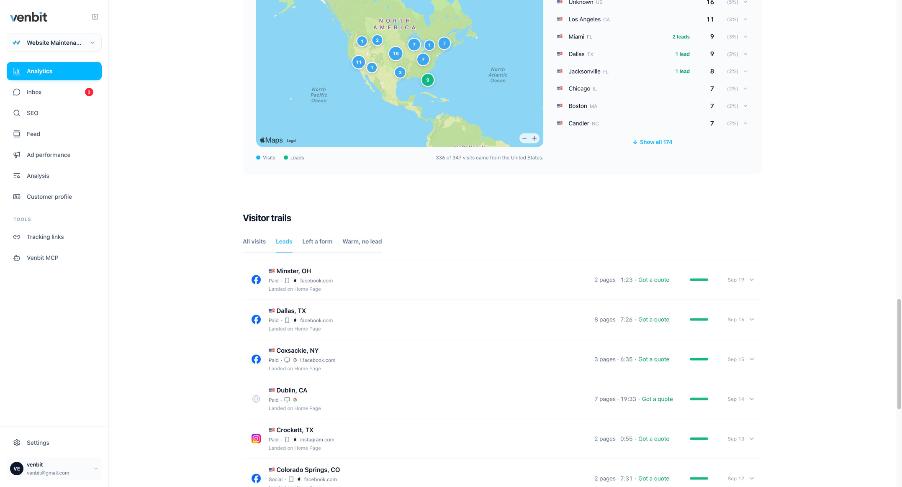
Six rows, before you open one
Read the six rows as a set before opening any of them. Six leads, six towns, Minster, Dallas, Coxsackie, Dublin, Crockett and Colorado Springs, and no two of them from the same place. Row one is a paid visit from facebook.com; the Crockett, Texas row came from Instagram. The towns are approximate, because they come from the IP address, so a row that says Dublin, California can be a person one town over, and that is close enough for the question the list answers, which is where the customers are and not where any one of them lives.
Then set the Minster row against the rest of the site. Two pages and 1:23 is a short visit for a lead. The Customer profile tab on the same demo site puts the typical lead at 4 pages and 5 minutes 26 seconds, and files two thirds of leads under Researched then reached out and a quarter under Came straight in. Minster is the short kind. A site that produces both kinds needs its form reachable from the landing page for the people who come straight in, and a chain of pages worth reading for the people who do not, and the Leads filter is where you count which kind you are getting.
Step two: read the trail
Open the first row. Below it is the whole visit of the lead from Minster, Ohio.
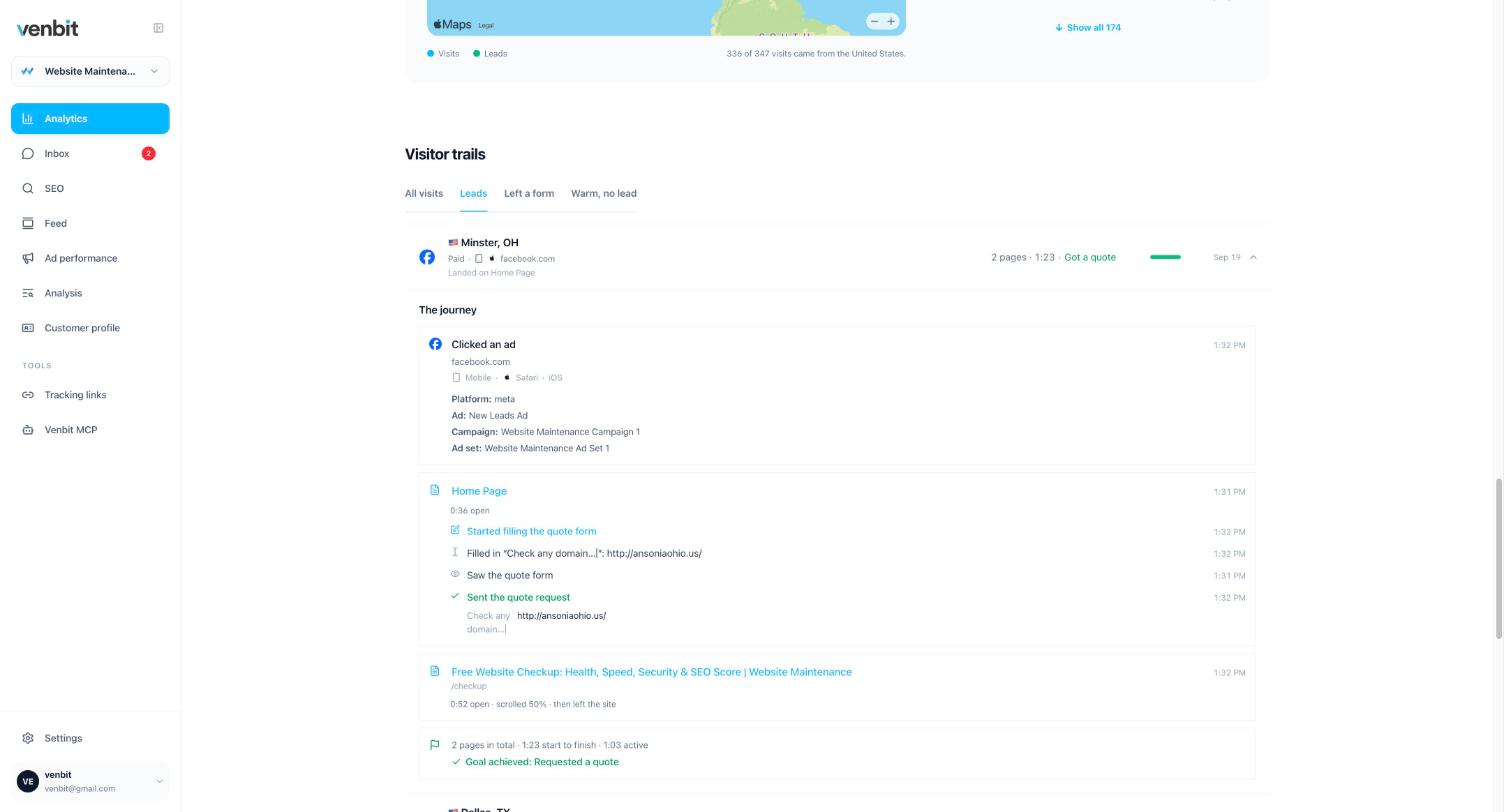
Read it top to bottom. The first line says how the person arrived: a click on an ad from facebook.com, in Safari on an iPhone, with the platform, the ad name and the campaign named from the click itself. Then the home page, open for 36 seconds. The form comes next: started filling it, filled in the 'Check any domain' field, saw the full form, sent the quote request. After that a second page, the Free Website Checkup, open 52 seconds, scrolled halfway, and the visit ended.
The summary line under it is the part I read first when I am in a hurry: 2 pages, 1:23 from start to finish, 1:03 of that active, and the goal achieved. Active time counts only while the tab was visible and focused, so a phone put down with the page open does not stretch it.
What each step means, and what it does not
A few of these lines are easy to over-read, so here is the honest version of each.
| The line | What it means | What it does not mean |
|---|---|---|
| Clicked an ad | The landing address carried an ad platform's click id (gclid, fbclid or msclkid) or the platform's campaign tags. | What the click cost. Venbit sees no spend unless you type in a daily budget, and anything worked out from that is marked estimated. |
| Started filling the form | A form field was focused. | That anything was typed. |
| Filled in 'Check any domain' | A field with that label was filled. The value shows only while Capture typed form values is on in Settings, and only to people allowed to see leads. | That the value is visible on a share link or to someone without the leads permission. They see the label alone. |
| Tapped the phone number | A tap on a telephone link. It is intent. | That a call connected, or that anyone picked up. |
| Direct | The browser sent no referrer. | That the person typed your address. Apps and some email clients send nothing, and the visit files as direct. |
| Minster OH | The town the IP address resolves to. | A street address, or the right town every time. It is approximate. |
| 0:36 on a page | Seconds the tab was visible and focused on that page. | Wall-clock time with the tab open in the background. |
Nobody is named until they name themselves. A visit is a random identifier in the browser, not a cookie and not a fingerprint, and the moment someone sends a form with their name on it, the lead in the inbox has a name while the trail behind it stays the same list of steps. What you can and cannot learn about an anonymous visitor is its own article, and the short version is that nobody can give you a name for a local visitor who did not give it.
Step three: read the ones who left
Switch the filter to Warm, no lead. These are visits that went deep and stopped short, and their trails end at the point your site lost them. Read ten in a row and the stopping point repeats, the same page or the same field each time. The repetition is the finding.
Left a form is the sharper filter. Everyone in it focused a field and did not send. Read the steps after 'Started filling the form': a visitor who filled three fields and left at the fourth is telling you about that field, while a visitor who focused one field for two seconds and went back to reading was browsing. Traffic without leads is diagnosed in this filter more than anywhere else.
The same trail on your phone
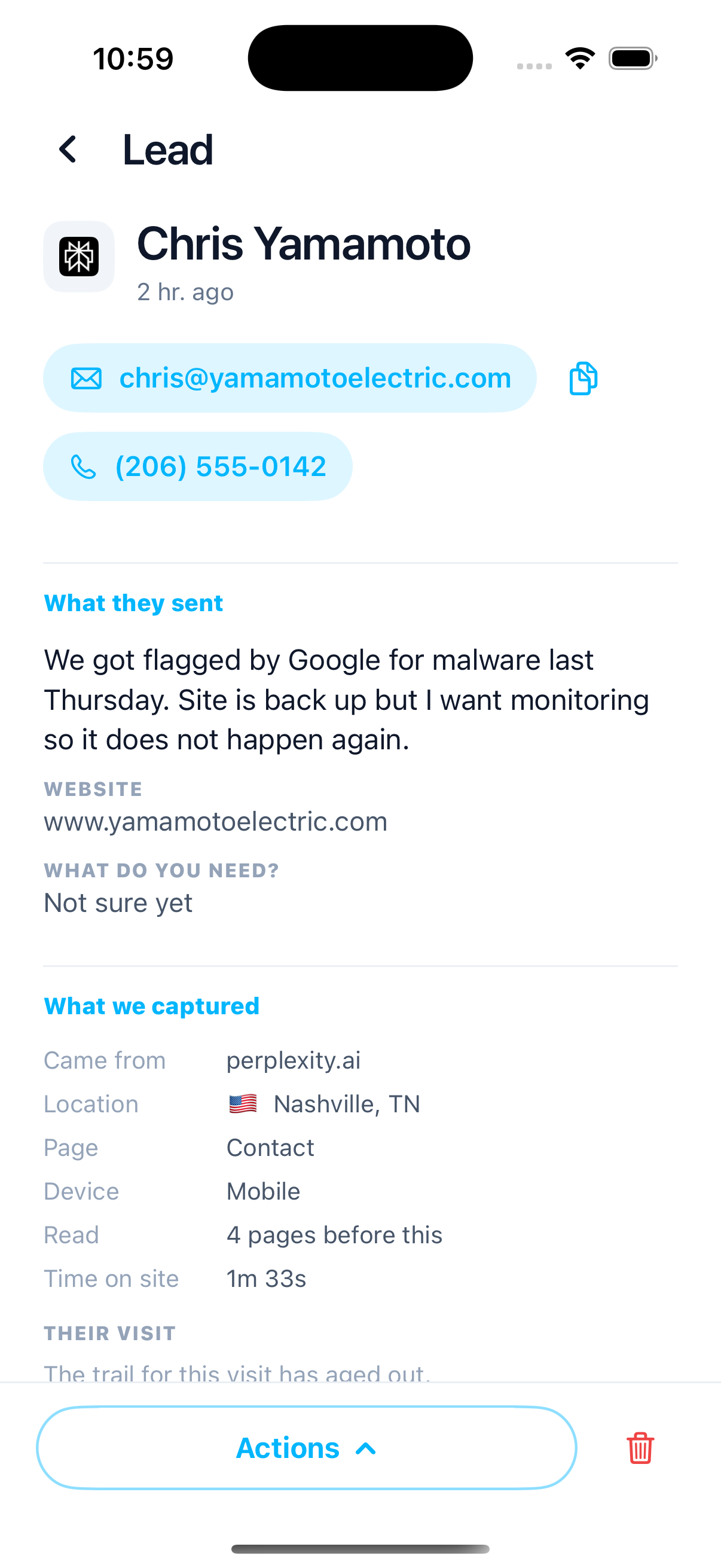
In the Venbit app for iPhone a lead opens to the message first, then what was captured about the visit: where they came from, the location, the page they wrote from, the device, the pages read and the time on site, with the trail underneath. It is the screen to open when a customer calls and says they filled out your form last night.
The app's Live screen is the same idea before the visit is over: anyone active on the site in the last five minutes, newest first, with the page they are on and the last thing they did on it. A trail is the visit after the fact; Live is the visit while it happens, and the two read the same way.
Your visitors' privacy
The tracker sets no cookies and stores no cross-site identifiers, so a trail does not need a cookie banner on its own account. Whether your site needs one for other reasons depends on what else runs on it, and the cookie banner question has a longer answer that is not legal advice. Raw IP addresses are never stored; the town is worked out and the address dropped.
A trail is also not a transcript. It records that a field labelled Phone was filled, and it records the value only while Capture typed form values is on in Settings. On the demo site that switch is on, which is why the domain typed into 'Check any domain' appears in the trail above. Anyone you invite without permission to see leads gets the same trail with the typed values removed, and the public share link carries no trails at all.
What a trail cannot tell you
It cannot tell you what the person thought. A visitor who stayed four minutes on your pricing page was either reading carefully or had stepped away with the tab in front; active time narrows that and does not settle it. It cannot tell you about the visits it never saw, people running a script blocker and people who came before the tracker was on the page. And it cannot see what someone did on another site before yours or after it.
Which pages get read, and how many before a lead is the question that follows once you have read twenty of these, and the customer profile answers it across every lead at once.
Related services
More on reading your website's numbers
Every question in this series, from Website Analytics for Small Business Owners.
Leads inbox4
Ad performance4
SEO tracking3
Visitor behaviour4
- What Is a Rage Click? The Definition and Why It Costs You Leads
- How to See What Visitors Do on Your Website, Step by Step (you are here)
- Which Pages on My Website Get Read? Your Most Visited Pages, Counted
- Why Do People Abandon My Contact Form? How to Find the Field
Feed and notifications3
Goals and measurement4

Tony Carnevale
Founder, Venbit
Tony started Venbit in Mill Creek, WA in 2011 and still does the work: web design, SEO, and the website analytics product the company builds and runs for its own clients. The numbers and screens in his articles come from that product, not from a content mill.