 Tony Carnevale
The short answer
You can see who is on your website right now in this sense: how many people are active in the last five minutes, the page each is reading, their approximate town, where they came from and the last thing they clicked. You cannot see a name until they give you one. Bots are removed before the list is drawn.
Key takeaways
- The device column is the second thing to read. A list that is all phones at 7pm is people on a couch; desktops at 10am on a Tuesday includes competitors and suppliers reading your prices.
- Nobody is identified by name. A visitor is a random identifier in their own browser until they send a form or tap your number.
- Direct means the browser sent no referring page. It is a gap in the data, and no tool can fill it honestly.
- Crawlers, uptime monitors and datacenter traffic are removed before anything is counted, so an empty live screen at 3am is normal.
- The moments worth watching are the hour after an ad or a mailer goes out. The rest of the time, the inbox and the daily feed are the numbers that matter.
Yes, you can see who is on your website right now, with one limit. A live screen shows how many people are on the site this minute, the page each one is reading, the town their connection resolves to, where they came from, and the last thing they clicked. It does not show a name.
I watch it for about an hour at a time, when something has just gone out: an ad set switched on, a mailer landing, an email to the customer list. The rest of the month it is the screen I open least.
What a live screen can tell you
Four things, all of them read from the visit itself. The page the person is on, because the tracker records every pageview. The source, because the browser hands over the referring page, or the ad platform stamps a click id on the landing address. The town, because an IP address resolves to an approximate place. And the last thing they did, because clicks, scrolls and form fields are events with a time on them, and the newest event is the one that says whether they are reading the price list or have just opened the quote form.
Put those together and a live row reads like this: someone in Dallas, from a Meta ad, on the services page, who just opened the quote form. That is enough to know whether the ad is sending the people you wanted and whether the landing page is holding them. It is not enough to know who they are, and it is not meant to be.
The device is on the row too, and on a local business site it is the detail I look at second. A list that is all phones at 7pm is people on a couch deciding whether to call tomorrow. A list that is desktops at 10am on a Tuesday is people at work, and a fair share of them are competitors and suppliers reading your prices.
What it cannot tell you
A name. Until a person types one into your form or taps your phone number, they are a random identifier stored in their own browser and nothing else. I wrote a longer piece on what is and is not possible when you try to identify a website visitor, and the short version is that anyone selling a name for ordinary local and consumer traffic is overselling.
The town is approximate. Geolocation of an IP address gets the metro area right most of the time and the suburb wrong a lot of the time, and a phone on cellular data can resolve to wherever the carrier routes it. Treat it as a region.
Direct means the absence of a referrer. When a live row says direct, the browser sent no referring page. That covers a typed address, a bookmark, a link in a text message, a link in most email apps, and a link from a document. It is a gap in the data, and no honest tool can fill it.
And nothing records the screen. There is no video of the person moving a cursor around your page. The row is a list of events with times on them, which is what makes it light enough to run on every site with one script tag and no consent banner.
The Live screen on the iPhone
Venbit's analytics has a Live tab that lists anyone active on the site in the last five minutes, newest first, with the page they are on and the last thing they did on it. Each row carries the town and the source beside the page.
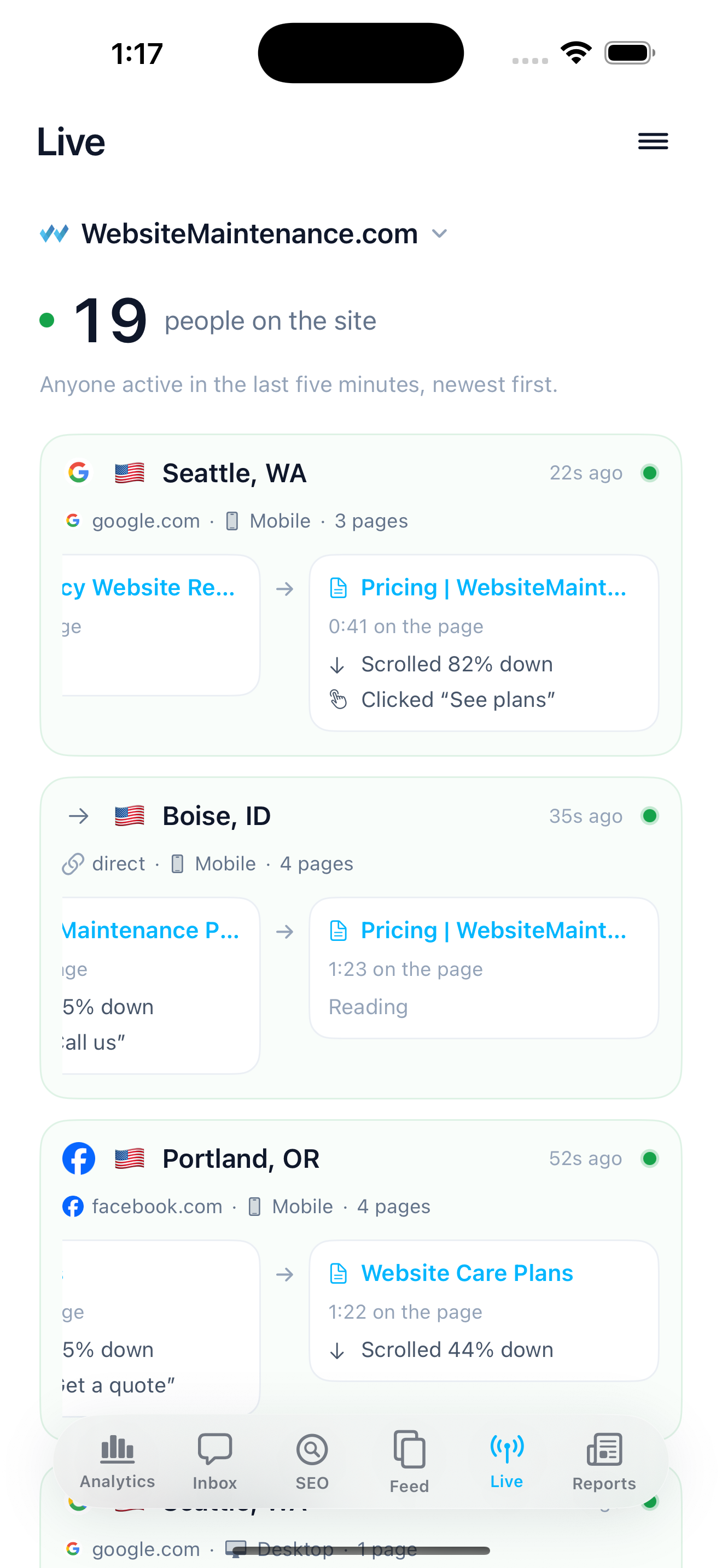
It lives in the iPhone app because that is where a live screen is useful. Nobody sits at a desk watching visitors arrive, but plenty of people glance at a phone from a van or a kitchen the hour after a mailer lands. The web portal has no live screen; the trails those visitors leave behind are the same records in both places.
A row leaves the list five minutes after that person's last event. If they are reading one long page without scrolling, the row holds; if they close the tab, it clears. That five-minute window is the definition of right now on this screen, and I am writing it down because a live count without a window is a number that means nothing.
Bots never reach the list
Crawlers, uptime monitors and datacenter traffic are removed before anything is counted. A live screen that counted them would read like a busy shop at three in the morning, because search engines and the AI crawlers read a small business site around the clock. If your hosting company's stats page says a hundred people visited yesterday and the live screen is empty most of the day, the difference is machines.
The detection is by user agent, by empty user agents, and by the cities that belong to cloud regions, Ashburn and the like. Bots are recorded, so you can look at them when you want to know which crawler read what, and hidden from every number by default. I went through how much of a typical site's traffic is bots in a separate article, and the share surprises most owners the first time they see it.
The Google Analytics Realtime report
Google Analytics has a Realtime report. Google's own documentation describes it as activity on the site over the last 30 minutes: the users in that window, the pages they are on and the events they have fired. It is there and it works. The reasons an owner stops opening it are the same as for the rest of GA4: it speaks in events and dimensions, and it was built for a desk. If you already run it, the trade-offs for a small business are worth ten minutes before you decide to keep it.
When watching live is worth your time
Three moments. The hour after an ad set goes live, to see whether the clicks land on the page you intended and whether anyone goes further than it. The day a mailer or a flyer lands, with a tracking link on it, so the rows carry the mailer's name and you can tell its visitors from everyone else's. And the minutes after a problem is reported, when you want to know whether anyone is on the site hitting it right now.
The ad case is the one I use most. An ad set that is sending people to the wrong page, or to a page that loads slowly on a phone, shows up on the live screen within the first hour as rows that land and leave. Caught on day one, that costs an afternoon. Caught in the month-end report, it costs a month of budget.
Outside those moments, I think watching live visitors is a habit worth breaking. One person reading your about page at 9pm tells you nothing you can act on, and five of them tell you nothing either. The number that matters by the end of the week is how many of those people sent a form or tapped the number, and that lives in the inbox and the daily feed, which I covered in what the app pushes to the phone.
After the visitor leaves
A live row does not vanish when the person does. It becomes a trail: the full visit, in order, with the landing page, every page after it, the time on each, the scrolls, the clicks, and whether it ended in a form, a tap or nothing. The trails list on the web portal is where I go the morning after, to read yesterday's visits as a list instead of watching them one at a time.
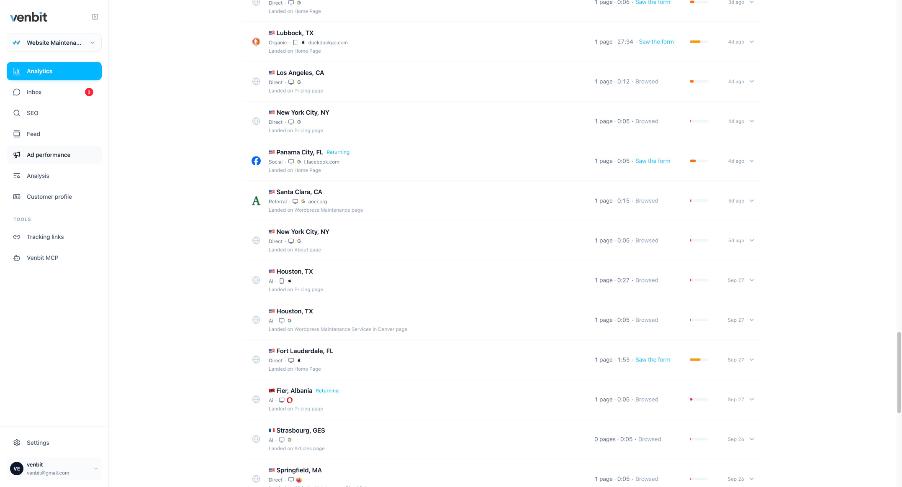
Filters on that list cut it to the leads, to the people who left a form without sending it, and to the warm visits that read several pages and did nothing. Those three lists are the useful version of who was on my site, because each row on them is a person who did something worth a follow-up.
Related services
More on reading your website's numbers
Every question in this series, from Website Analytics for Small Business Owners.
Leads inbox4
Ad performance4
SEO tracking3
Visitor behaviour4
Feed and notifications3
- How to See Who Is on Your Website Right Now (you are here)
- What to Check in Website Analytics Every Day
- Website Analytics App for iPhone: Stats, Widget and Push
Goals and measurement4

Tony Carnevale
Founder, Venbit
Tony started Venbit in Mill Creek, WA in 2011 and still does the work: web design, SEO, and the website analytics product the company builds and runs for its own clients. The numbers and screens in his articles come from that product, not from a content mill.
Sources
- Google Analytics Help, [GA4] Realtime report
- Venbit metric definitions: visitor, bot traffic, visit